Distributed Storage#
Types of Cloud Storage#
Modern computing infrastructures, like clouds (e.g. OpenStack) or HPC clusters running Slurm, rely on a sophisticated configuration of resources. Most prominently, powerful CPUs and GPUs providing exaflops of performance1https://en.wikipedia.org/wiki/TOP500 and high-speed networks acting as the nervous system. Less visible, but equally important is the robust strategy to store and access data.
In distributed systems, storage is often present in multiple distinct tiers, and understanding the differences between them is not just an architectural detail but a crucial competency.
Choosing the wrong storage type can not just mean slow job; it can starve GPUs, waste expensive compute credits, and even severely affect the performance of an entire cluster.
Selecting an inappropriate storage type can create significant performance bottlenecks, waste computational resources, and lead to the “Noisy Neighbor” effect, where inefficient I/O operations (such as unzipping millions of small files on a parallel filesystem designed for streaming) degrade performance for all users on the cluster.
To make good use of such infrastructures and help to maintain system stability, four primary storage architectures should be understood:
(The Virtual USB Drive)
(The Infinite Bucket)
(The Cloud NAS)
(The Scratchpad)
Block Storage#
Virtual USB Drive
Think of Block Storage as a raw, unformatted USB drive that is plugged permanently into a single specific computer.
At the most fundamental level, every virtual machine or compute node needs a “local disk” to boot the operating system and run applications. This is Block Storage.
In a cloud environment like OpenStack, systems like Cinder (often relying on Ceph RBD) carve out these virtual drives from a massive pool of disks. The defining characteristic of Block Storage is exclusivity: a block volume is typically attached to only one node at a time. This exclusivity allows for fast and low-latency access, making it the perfect home for your Operating System, your local software libraries (like Conda environments), and high-performance databases (like PostgreSQL) that require transactional integrity.
Architecture#
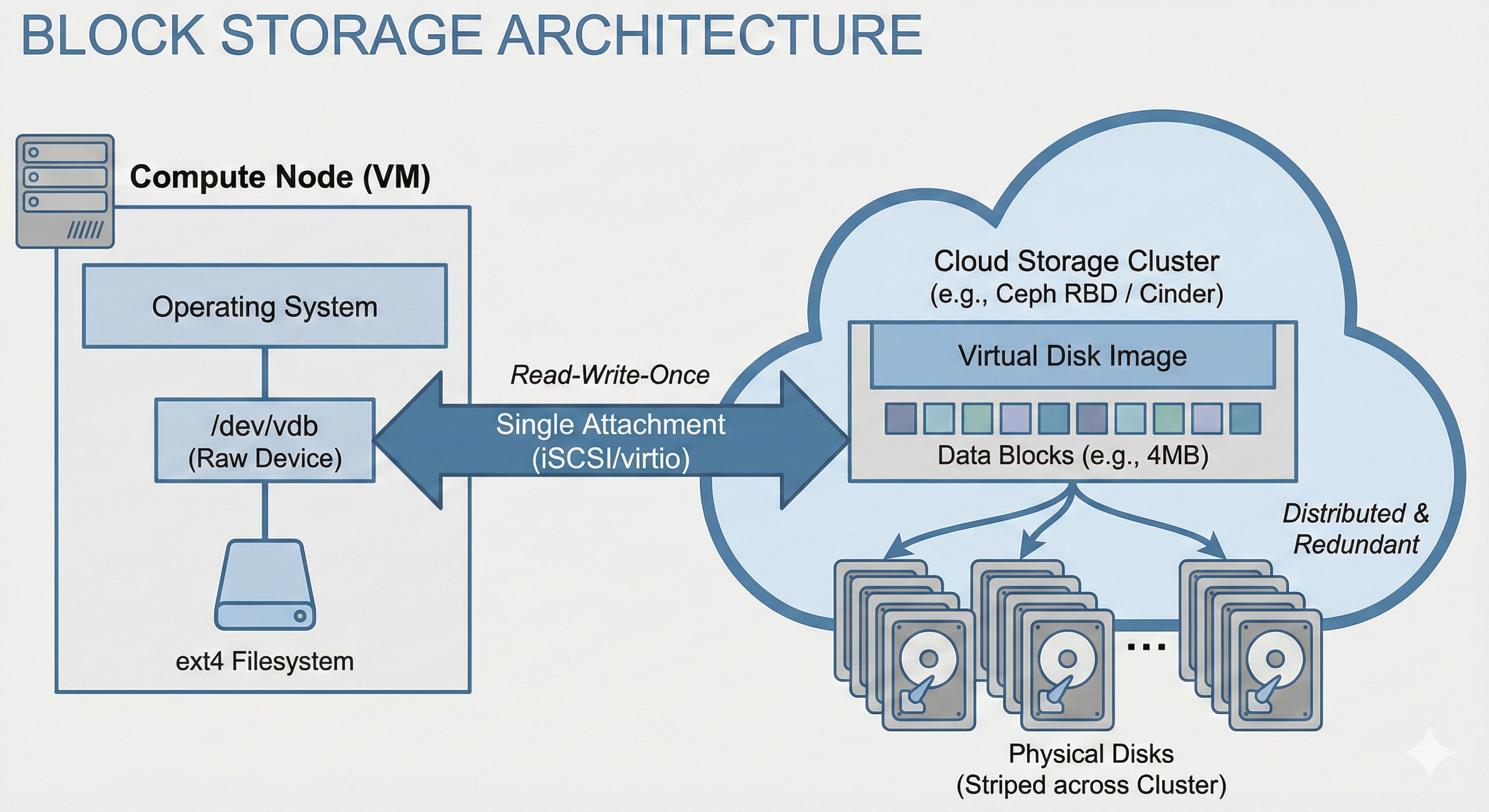
Block Storage is handled by a storage cluster, connecting multiple storage devices (computer) together as a single unit. A common, open-source software that can create a storage cluster on top of connected computers is Ceph. In Block Storage, Ceph splits up a block into fixed-size junks (e.g., 4MB) that are then distributed in a redundant manner (usually 3 copies of each block) across the physical disks in the storage cluster.
Usage#
In a OpenStack cloud, Block Storage is managed by an application called Cinder. When a volume is requested, Cinder talks to the backend (like Ceph) to reserve the blocks and attaches them to to the target VM via iSCSI or KVM virtio.
A machine, virtual or not, can also interface directly with a Ceph Block Storage via a kernel module called rbd.
rbd Example
Creating a new block:
rbd create mydisk --size 100G
Attach the volume (i.e. block) via GUI/SDK
Partition it
parted /dev/sdX mklabel gptCerate a filesystem
mkfs.ext4 -L mylabel /dev/sdxYMount the filesystem
mount /dev/sdxY /mnt/mydisk
In a virtualized environment this can be done directly from a VM or, if access allows it, on the Hypervisor which can then “present” the block storage to the VM as a physical disk.
In practice, attaching a block storage via Cinder, the Hypervisor or directly on the VM using rbd should show little to not difference in terms of performance.
Once a block is added to a machine, it becomes visible as a device (e.g. under /dev/sdX).
In most cases this device will be used as filesystem, so it first needs to be (or should be) partitioned using tools like fdisk, gdisk or parted, and then a filesystem needs to be added (e.g. with mkfs).
Finally, the filesystem need to be mounted so that it can be used (use mount for one-time mounts and add an entry to /etc/fstab for permanent mounting).
Use Cases#
Databases:
Hosting a PostgreSQL or MySQL database that requires low-latency, transactional write performance.
Persistent Volumes:
Keeping OS settings and installed libraries (Conda environments) safe even if the VM is terminated.
High-Speed Scratch:
“Checking out” a specific dataset to a fast, temporary drive for intense processing (e.g. on a single GPU node).
Pros & Cons#
Pros |
Cons |
|---|---|
Lowest Latency: |
Not Shared: |
Compatibility: |
Management: |
Object Storage#
“Infinite Bucket”
Simply toss in your data, neither worry about size nor file counts.
For massive datasets or large numbers of individual files, Block Storage becomes inefficient due to its lack of scalability and inability to be shared across multiple nodes. Object Storage addresses this need.
Rather than organizing data in a hierarchical directory tree, Object Storage stores data as flat objects accessed via an API (such as HTTP REST), identified by a unique ID. It is designed for durability and infinite scale rather than rapid modification; data is typically written once and read many times. In many ecosystems, this is provided by OpenStack Swift or Ceph RGW (RADOS Gateway), which offer an S3-compatible interface. This tier, sometimes also alled “Data Lake” serves in any sort of computational workflow. It is a repository for raw logs, images, and archives that must be accessible from any node in the cluster but do not require instant modification.
Architecture#
Object Storage is handled by a storage cluster, connecting multiple storage devices (computers) together as a single unit. A common, open-source software that can create a storage cluster for Object Storage on top of connected computers is Ceph. In Object Storage, Ceph treats each file as a discrete “object” that tightly bundles the raw binary payload together with custom, searchable metadata and a globally unique identifier (URI).
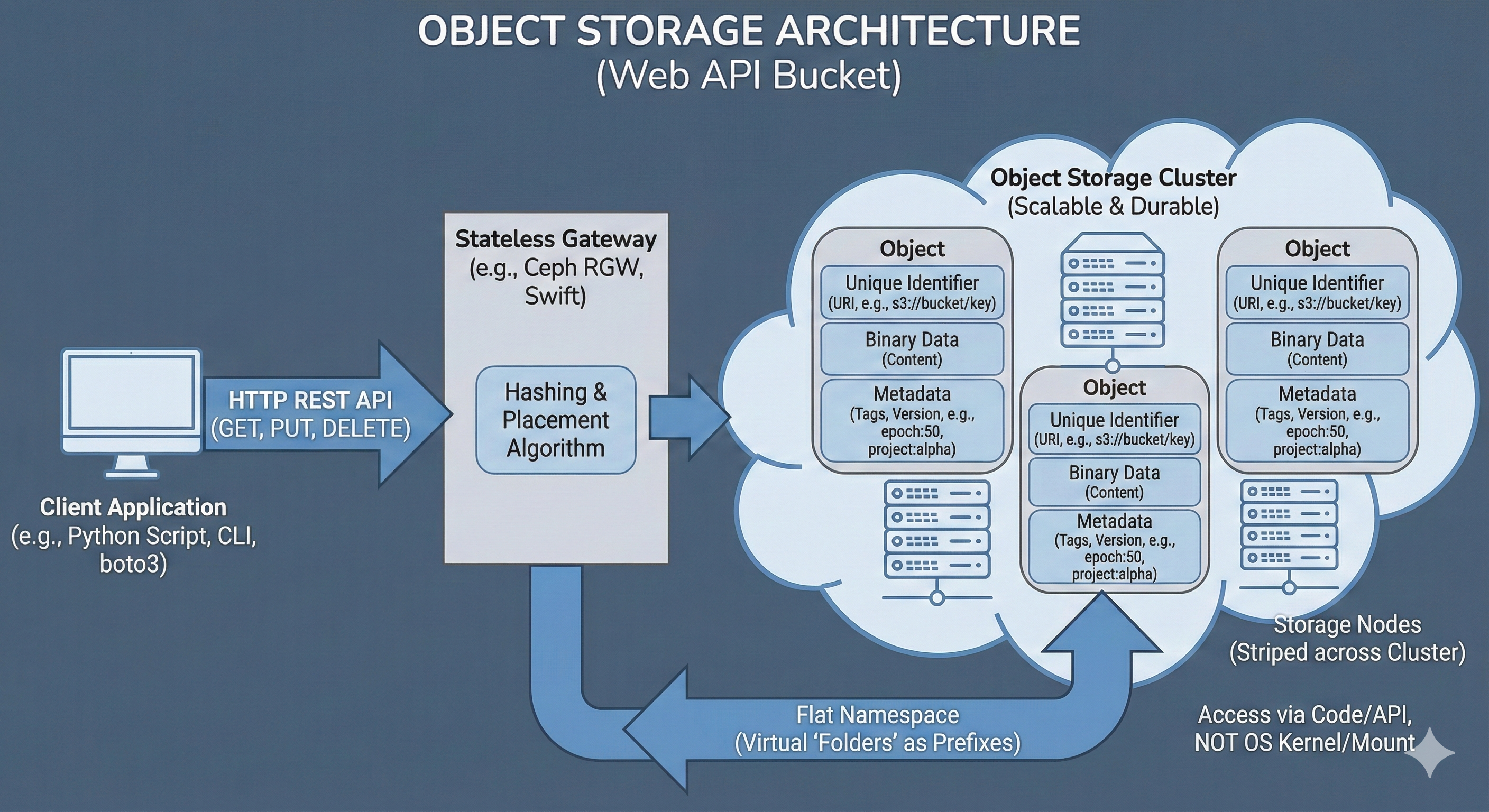
These objects are then mapped via a hashing algorithm and distributed in a redundant manner (usually 3 copies of each object) across the physical disks in the storage cluster.
Usage#
In an OpenStack cloud, Object Storage is typically managed by an application called Swift (though many deployments use Ceph’s RADOS Gateway for added S3 compatibility). When a bucket or object is requested, a specialized API server acting as the gateway (such as the Ceph RADOS Gateway daemon or the OpenStack Swift proxy) intercepts the connection.
mc (MinIO Client) Example
Creating a new bucket and copy a file there using the open-source MinIO Client:
Setup
mc alias set mym https://storage.cloud:9000 A_KEY S_KEYCreate a bucket
mc mb mym/mybAdd data:
mc cp myds.csv mym/myb/myds.csvRetrieve data:
mc cp mym/myb/myds.csv
This gateway manages the namespace, which is the flat, globally unique mapping of bucket names and object URLs (e.g., https://storage.cloud/mybucket/mydata/dataset.csv), authenticates the provided API keys, and translates the HTTP REST commands into the underlying storage cluster’s protocol.
A machine interfaces directly with Object Storage via HTTP REST APIs over the network.
In any environment, this is usually done using modern, open-source command-line clients (like mc or rclone) or directly within application code using dedicated libraries (like Python’s boto3 or s3fs).
In practice, accessing object storage from a local laptop, a cloud VM, or an HPC compute node operates exactly the same way, provided the machine has network access to the endpoint URL.
Metadata
No more epoch42_acc97.pt file naming, simply attach the metadata:
mc cp --attr "epoch=42;accuracy=0.97" model.pt mym/myb/model.pt
One of the most powerful features of Object Storage is the ability to attach custom, structured metadata directly to the object.
Unlike a traditional file system where metadata is limited to basic attributes like creation date or file size, an object store allows arbitrary key-value pairs to be embedded alongside the binary data.
This is particularly useful for data science workflows, allowing dataset versions, experiment parameters, or machine learning model metrics (e.g., epoch=50, accuracy=0.98) to be tracked without needing a separate database.
Custom metadata is passed as HTTP headers during the upload or update process. Later, these tags can be queried instantly via the API to filter or organize data without ever downloading the actual, heavy payload.
pandas Example
Streaming an object directly into memory:
import pandas as pd

df = pd.read_csv(
    's3://myb/dset.csv',
    storage_options={
        "key": "A_KEY",
        "secret": "S_KEY",
        "client_kwargs": {
            'endpoint_url': 'https://storage.cloud'
        }
    }
)
Instead of traditional file operations, data is simply pushed to and pulled from the bucket using these API calls. This allows massive datasets to be streamed directly into an application’s memory or processed in chunks, bypassing the need for local storage space entirely.
Use Cases#
Data Lakes:
Storing massive, unstructured datasets (images, logs, raw text) that grow indefinitely.
Model Artifacts:
Versioning and storing trained model weights (.pt, .h5) with metadata tags (e.g., accuracy: 0.98, epoch: 50).
Cloud-Native Pipelines:
Scripts using boto3 or pandas (e.g. read_parquet('s3://...')) to pull data directly into memory without a local download step.
Pros & Cons#
Pros |
Cons |
|---|---|
Infinite Scalability: |
High Latency: |
Cost-Effective: |
Not POSIX: |
Metadata Rich: |
Immutable Data: |
Persistent Shared Filesystems#
Cloud NAS
A standard network folder where your code lives, safe and accessible from every node like a local directory.
While Object Storage is efficient for automated retrieval, users and legacy applications often require the familiarity of a directory tree. A centralized location is needed to store code, configuration files, and shared scripts that behave like a standard hard drive but remain accessible across the network. This is the Persistent Shared Filesystem.
Often referred to as the “Home Directory,” this storage layer (managed by Manila in OpenStack or CephFS in Ceph clusters) is fully POSIX-compliant.
Standard terminal commands like ls, grep, and cp function as expected.
The priority of this tier is reliability and data safety over raw throughput.
It ensures that changes in your home folder (~/) on a login node are immediately available on compute nodes.
It seamlessly handles file locking and permissions to allow collaboration without data conflicts.
Architecture#
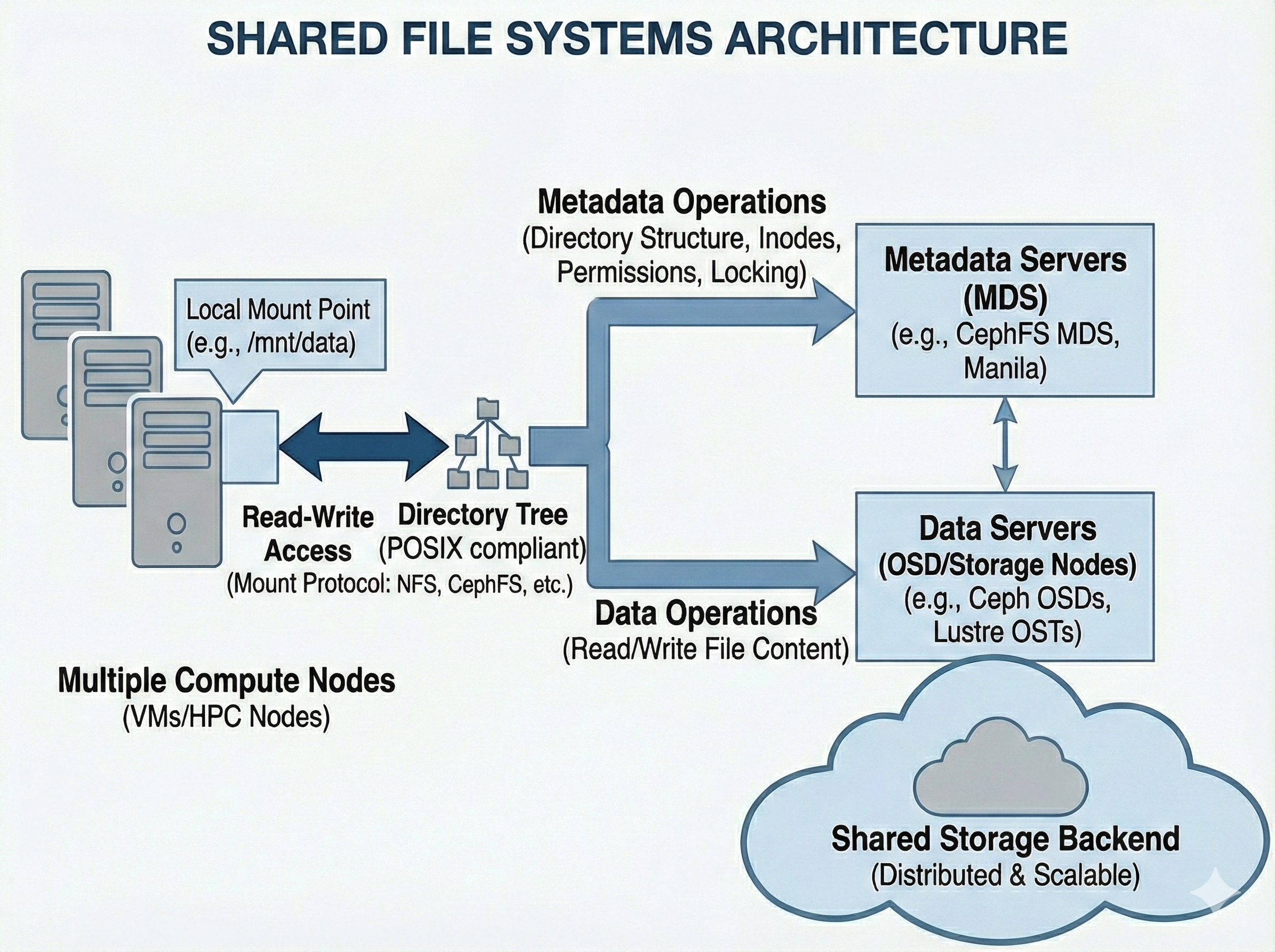
The system splits responsibilities into two distinct layers. Metadata Servers (MDS) handle the directory tree (inodes, permissions, file names, and locking operations), while the actual binary file data is distributed across standard data storage nodes (like Ceph OSDs). This separation allows the directory structure to scale and prevents the system from bottlenecking when hundreds of compute nodes request file paths simultaneously.
Usage#
In most cases, Shared Filesystems are provisioned centrally by administrators and will appear “just like a normal folder” (e.g., /home or /scratch).
However, if you are provisioning one dynamically in a cloud environment (like OpenStack), it is typically managed by a service called Manila. Manila creates the share and provides a network endpoint (usually via NFS or CephFS protocols).
mount Example
Mounting a share to a local directory:
mkdir -p /mnt/mycfs
mount -t ceph 10.0.0.1:6789:/ /mnt/mycfs -o name=client.myclient,secret=mySecret
Mostly provisioned a priori
Provision a share (e.g., via OpenStack Manila).
Configure network access rules (IPs or CephX).
Mount the share locally:
mount -t ceph 10.0.0.1:6789:/ /mnt/cephfs -o name=client.myclient,secret=mySecret
To connect, the compute node or VM must mount this endpoint over the network. The operating system kernel handles the translation, mapping the remote directory tree to a local mount point (like /mnt/shared_data). From that point forward, any application reading or writing to that directory is actually communicating over the network to the central storage cluster.
For the connection to survive system reboots, the mount details must be added to the node’s /etc/fstab file. Because this relies heavily on network protocols and real-time file locking, it is inherently more complex under the hood than local Block Storage, even if it feels identical to the end user.
Use Cases#
Distributed Training:
Multiple nodes (e.g., in a Slurm job) reading the exact same training data or writing logs to a shared directory simultaneously.
Home Directories:
Keeping your code, scripts, and configuration (.bashrc) accessible regardless of which compute node you log into.
Legacy Applications:
Running software that expects standard file paths and cannot be rewritten to use S3 APIs.
Pros & Cons#
Pros |
Cons |
|---|---|
Collaboration: |
Metadata Bottlenecks: |
Ease of Use: |
Complexity: |
Ephemeral Storage#
The “Scratchpad”
High-speed workspace for heavy I/O, but wiped clean when the work is done.
A specialized storage tier exists to meet the unique demands of high-performance computing: Ephemeral Storage. This tier is engineered purely for speed and throughput, at the expense of long-term persistence and redundancy to feed data to CPUs and GPUs as fast as possible.
In practice, Ephemeral Storage comes in two distinct flavors:
Global Scratch:
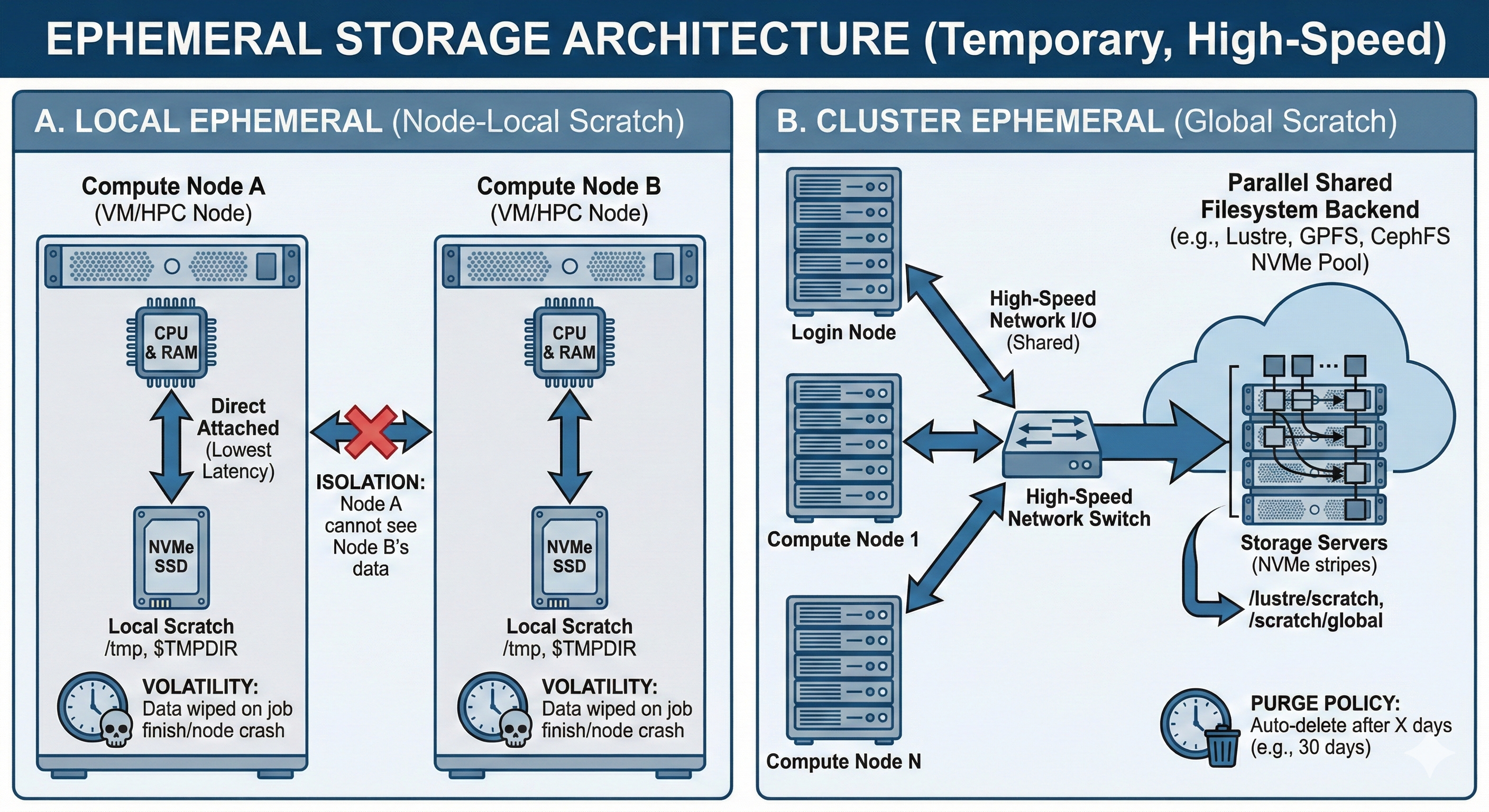
In large clusters where a job may span hundreds of nodes, standard persistent shared filesystems are often too slow to handle the aggregate I/O demand. The solution is an Ephemeral Shared Filesystem (utilizing technologies like Lustre, GPFS, or a flash-optimized CephFS pool).
This tier allows hundreds of nodes to read and write to the same dataset simultaneously.
However, because high-performance storage is a limited resource, it is usually governed by strict “Purge Policies”.
Data stored here (often in directories like /scratch/<user>) is automatically deleted after a set period (e.g., 30 days).
It serves as scratchpad for heavy calculations, but never as a permanent storage for results.
Local Scratch:
In both Cloud (OpenStack) and HPC (Slurm), access to local Ephemeral Storage might also be possible. This is the physical SSD or NVMe drive directly inside the compute node a job is running on, or a physical disk on a host machine in a cloud.
Unlike Global Scratch, this storage is isolated and not actually shared at all. Local Scratch often provides the absolute lowest latency because there is no network overhead. It is ideal for temporary files, spillover when RAM is full (swap), or unzipping datasets for a specific job. However, Local Scratch is strictly volatile: the moment job finishes or a VM is terminated, this data is instantly wiped.
Architecture#
Local Ephemeral physically resides inside the compute node’s chassis (Direct Attached Storage), operating independently of the broader network. Global Ephemeral, on the other hand, utilizes a parallel shared filesystem backend connected via high-throughput network switches, stripping files across dozens of NVMe storage servers to maximize aggregate bandwidth for the entire cluster.
Usage#
Interacting with Ephemeral Storage depends entirely on whether you are using the Local or Global variant.
For Global Scratch, access feels identical to a standard shared network drive.
The path is typically a well-known mount point, such as /scratch/ or /lustre/scratch.
Users manually copy (stage) their heavy datasets to this location before executing a distributed job.
slurm Example
Request local storage via scheduler (e.g., Slurm:
--tmp=100G).Point application cache to
$TMPDIR.Stage large shared datasets to
/scratch/.Move results to permanent storage before they are purged!
The critical operational rule here is memory: users must script their workflows to copy the final output data back to persistent storage (like S3 or their Home Directory) before the automated purge scripts permanently delete it.
For Local Scratch, the workflow is highly dynamic and usually managed by the workload scheduler (like Slurm).
When a compute job starts, the scheduler creates a private, temporary folder on the node’s physical NVMe drive.
It exposes this path to your script via an environment variable (most commonly $TMPDIR).
Applications and scripts should be configured to write their temporary files, cache, or RAM-spillover to this variable.
The exact millisecond the job completes or fails, the scheduler forcefully runs rm -rf on that directory, isolating your data from the next user.
Use Cases#
Intermediate Processing (Local):
Unzipping a massive dataset, preprocessing the raw text or images on a single node, and deleting the raw files immediately to completely bypass network bottlenecks.
Distributed Checkpoints (Global):
Saving the state of a massive Deep Learning model every epoch across 50 active nodes. If the job crashes, it can be instantly restarted from the shared global checkpoint without losing days of progress.
Heavy Random I/O (Local/Global):
Workloads that execute thousands of tiny reads/writes per second (such as SQLite databases or massive pandas dataframe manipulations) which would choke the metadata servers of standard persistent storage.
Pros & Cons#
Pros |
Cons |
|---|---|
Maximum Performance: |
High Volatility: |
System Stability: |
Isolation vs. Contention: |
Sources:
https://docs.ceph.com/en/
https://docs.openstack.org/
https://slurm.schedmd.com/documentation.html
https://wiki.lustre.org/Main_Page