
Object Storage#
“Infinite Bucket”
Simply toss in your data, neither worry about size nor file counts.
For massive datasets or large numbers of individual files, Block Storage becomes inefficient due to its lack of scalability and inability to be shared across multiple nodes. Object Storage addresses this need.
Rather than organizing data in a hierarchical directory tree, Object Storage stores data as flat objects accessed via an API (such as HTTP REST), identified by a unique ID. It is designed for durability and infinite scale rather than rapid modification; data is typically written once and read many times. In many ecosystems, this is provided by OpenStack Swift or Ceph RGW (RADOS Gateway), which offer an S3-compatible interface. This tier, sometimes also alled “Data Lake” serves in any sort of computational workflow. It is a repository for raw logs, images, and archives that must be accessible from any node in the cluster but do not require instant modification.
Architecture#
Object Storage is handled by a storage cluster, connecting multiple storage devices (computers) together as a single unit. A common, open-source software that can create a storage cluster for Object Storage on top of connected computers is Ceph. In Object Storage, Ceph treats each file as a discrete “object” that tightly bundles the raw binary payload together with custom, searchable metadata and a globally unique identifier (URI).
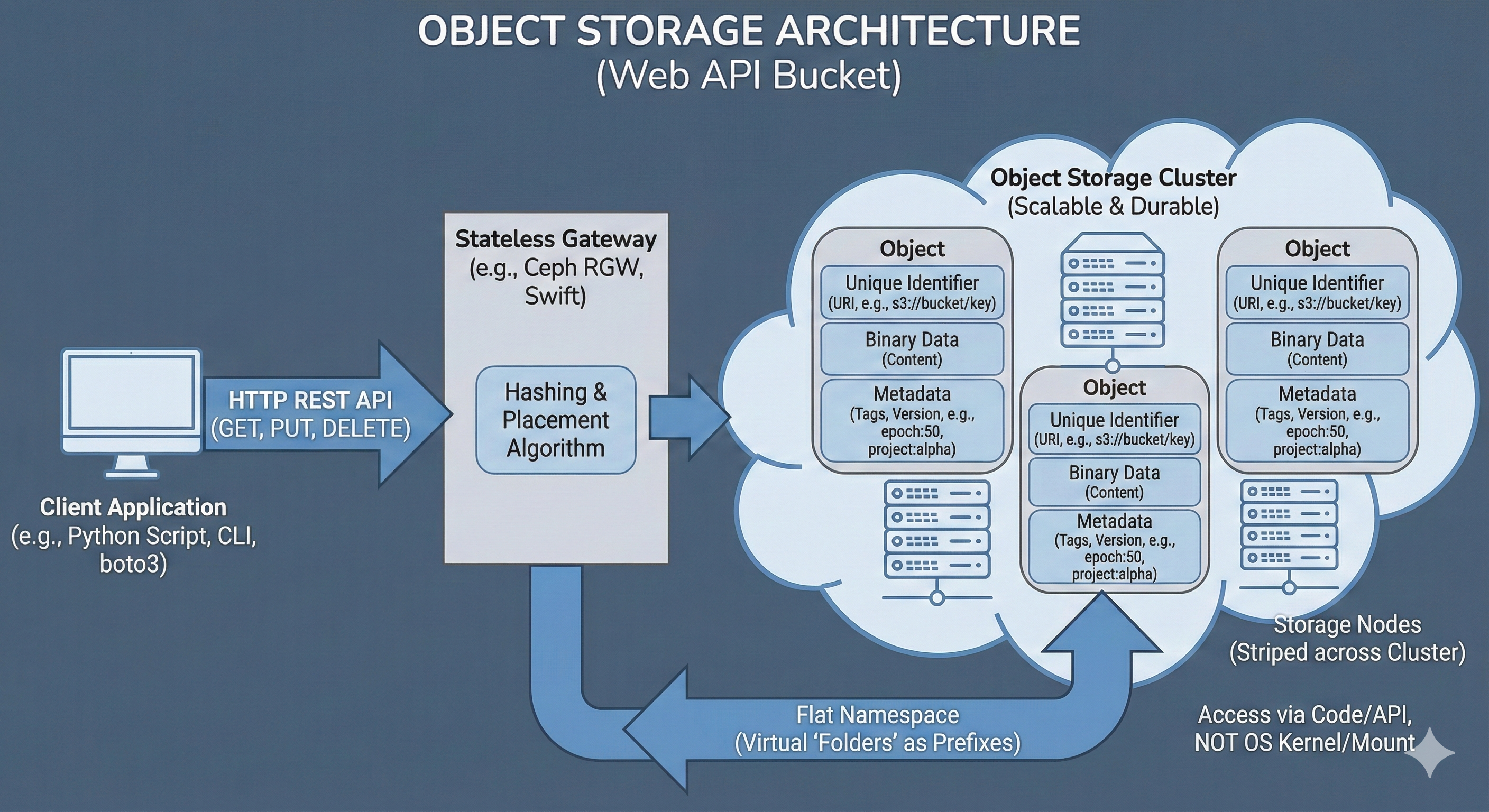
These objects are then mapped via a hashing algorithm and distributed in a redundant manner (usually 3 copies of each object) across the physical disks in the storage cluster.
Usage#
In an OpenStack cloud, Object Storage is typically managed by an application called Swift (though many deployments use Ceph’s RADOS Gateway for added S3 compatibility). When a bucket or object is requested, a specialized API server acting as the gateway (such as the Ceph RADOS Gateway daemon or the OpenStack Swift proxy) intercepts the connection.
mc (MinIO Client) Example
Creating a new bucket and copy a file there using the open-source MinIO Client:
Setup
mc alias set mym https://storage.cloud:9000 A_KEY S_KEYCreate a bucket
mc mb mym/mybAdd data:
mc cp myds.csv mym/myb/myds.csvRetrieve data:
mc cp mym/myb/myds.csv
This gateway manages the namespace, which is the flat, globally unique mapping of bucket names and object URLs (e.g., https://storage.cloud/mybucket/mydata/dataset.csv), authenticates the provided API keys, and translates the HTTP REST commands into the underlying storage cluster’s protocol.
A machine interfaces directly with Object Storage via HTTP REST APIs over the network.
In any environment, this is usually done using modern, open-source command-line clients (like mc or rclone) or directly within application code using dedicated libraries (like Python’s boto3 or s3fs).
In practice, accessing object storage from a local laptop, a cloud VM, or an HPC compute node operates exactly the same way, provided the machine has network access to the endpoint URL.
Metadata
No more epoch42_acc97.pt file naming, simply attach the metadata:
mc cp --attr "epoch=42;accuracy=0.97" model.pt mym/myb/model.pt
One of the most powerful features of Object Storage is the ability to attach custom, structured metadata directly to the object.
Unlike a traditional file system where metadata is limited to basic attributes like creation date or file size, an object store allows arbitrary key-value pairs to be embedded alongside the binary data.
This is particularly useful for data science workflows, allowing dataset versions, experiment parameters, or machine learning model metrics (e.g., epoch=50, accuracy=0.98) to be tracked without needing a separate database.
Custom metadata is passed as HTTP headers during the upload or update process. Later, these tags can be queried instantly via the API to filter or organize data without ever downloading the actual, heavy payload.
pandas Example
Streaming an object directly into memory:
import pandas as pd

df = pd.read_csv(
    's3://myb/dset.csv',
    storage_options={
        "key": "A_KEY",
        "secret": "S_KEY",
        "client_kwargs": {
            'endpoint_url': 'https://storage.cloud'
        }
    }
)
Instead of traditional file operations, data is simply pushed to and pulled from the bucket using these API calls. This allows massive datasets to be streamed directly into an application’s memory or processed in chunks, bypassing the need for local storage space entirely.
Use Cases#
Data Lakes:
Storing massive, unstructured datasets (images, logs, raw text) that grow indefinitely.
Model Artifacts:
Versioning and storing trained model weights (.pt, .h5) with metadata tags (e.g., accuracy: 0.98, epoch: 50).
Cloud-Native Pipelines:
Scripts using boto3 or pandas (e.g. read_parquet('s3://...')) to pull data directly into memory without a local download step.
Pros & Cons#
Pros |
Cons |
|---|---|
Infinite Scalability: |
High Latency: |
Cost-Effective: |
Not POSIX: |
Metadata Rich: |
Immutable Data: |