Persistent Shared Filesystems#
Cloud NAS
A standard network folder where your code lives, safe and accessible from every node like a local directory.
While Object Storage is efficient for automated retrieval, users and legacy applications often require the familiarity of a directory tree. A centralized location is needed to store code, configuration files, and shared scripts that behave like a standard hard drive but remain accessible across the network. This is the Persistent Shared Filesystem.
Often referred to as the “Home Directory,” this storage layer (managed by Manila in OpenStack or CephFS in Ceph clusters) is fully POSIX-compliant.
Standard terminal commands like ls, grep, and cp function as expected.
The priority of this tier is reliability and data safety over raw throughput.
It ensures that changes in your home folder (~/) on a login node are immediately available on compute nodes.
It seamlessly handles file locking and permissions to allow collaboration without data conflicts.
Architecture#
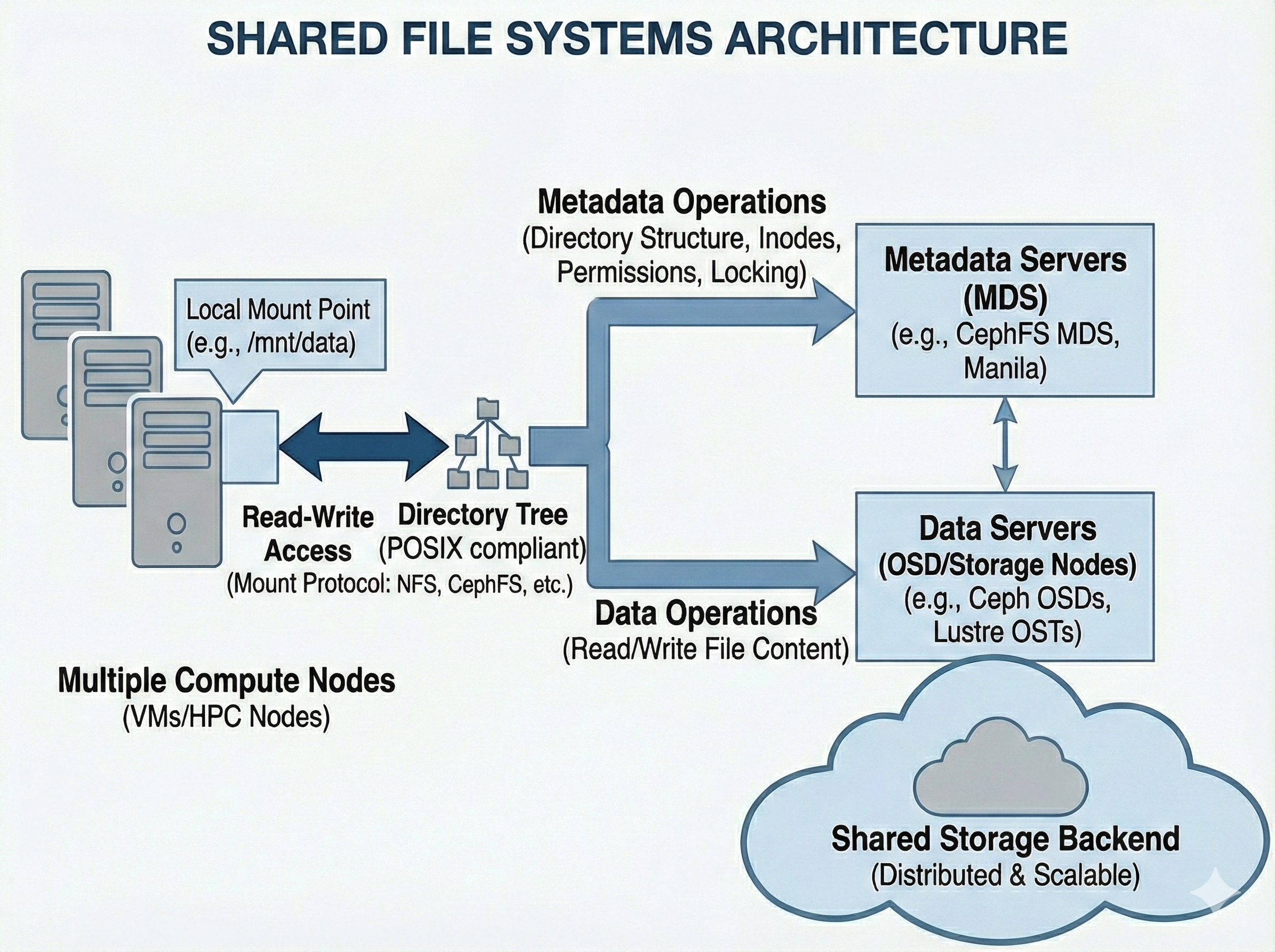
The system splits responsibilities into two distinct layers. Metadata Servers (MDS) handle the directory tree (inodes, permissions, file names, and locking operations), while the actual binary file data is distributed across standard data storage nodes (like Ceph OSDs). This separation allows the directory structure to scale and prevents the system from bottlenecking when hundreds of compute nodes request file paths simultaneously.
Usage#
In most cases, Shared Filesystems are provisioned centrally by administrators and will appear “just like a normal folder” (e.g., /home or /scratch).
However, if you are provisioning one dynamically in a cloud environment (like OpenStack), it is typically managed by a service called Manila. Manila creates the share and provides a network endpoint (usually via NFS or CephFS protocols).
mount Example
Mounting a share to a local directory:
mkdir -p /mnt/mycfs
mount -t ceph 10.0.0.1:6789:/ /mnt/mycfs -o name=client.myclient,secret=mySecret
Mostly provisioned a priori
Provision a share (e.g., via OpenStack Manila).
Configure network access rules (IPs or CephX).
Mount the share locally:
mount -t ceph 10.0.0.1:6789:/ /mnt/cephfs -o name=client.myclient,secret=mySecret
To connect, the compute node or VM must mount this endpoint over the network. The operating system kernel handles the translation, mapping the remote directory tree to a local mount point (like /mnt/shared_data). From that point forward, any application reading or writing to that directory is actually communicating over the network to the central storage cluster.
For the connection to survive system reboots, the mount details must be added to the node’s /etc/fstab file. Because this relies heavily on network protocols and real-time file locking, it is inherently more complex under the hood than local Block Storage, even if it feels identical to the end user.
Use Cases#
Distributed Training:
Multiple nodes (e.g., in a Slurm job) reading the exact same training data or writing logs to a shared directory simultaneously.
Home Directories:
Keeping your code, scripts, and configuration (.bashrc) accessible regardless of which compute node you log into.
Legacy Applications:
Running software that expects standard file paths and cannot be rewritten to use S3 APIs.
Pros & Cons#
Pros |
Cons |
|---|---|
Collaboration: |
Metadata Bottlenecks: |
Ease of Use: |
Complexity: |