
Virtualization#
Virtualization is the technology that allows multiple independent computing environments to run on shared physical hardware, enabling the flexible and efficient resource utilization that underpins modern scientific computing infrastructure.
Types#
Hardware Virtualization#
Hardware Virtualizaton is the key concept in a cloud infrastructure. It became broadly available for the standard x86 computer architecture in the early 2000s and lead to a profound change in how computer infrastructures were utilized.
The most common form, Hardware Virtualization, aims to decouple Operating System (OS) and applications from the physical hardware by providing an abstraction layer, mimicking real hardware to the virtualized Operating System.
This software (i.e. the abstraction layer) is called Hypervisor and intercepts communication between the OS and the computer. A Hypervisor provides the OS with all the information and interfaces the underlying hardware typically would, leading the OS to “believe” that it runs directly on hardware. The advantage of such a softer buffer between OS and computer comes from the flexibility that it allows in the declaration of the hardware specifications to the OS: A Hypervisor can report only a fraction of the actual hardware to the OS, effectively hindering the OS from accessing all physically available resources. This ultimately enables a single computer to host multiple (virtualized) Operating Systems, allowing for a better utilization of the hardware.
From a users perspective a virtualization layer allows to spawn up a OS with customized resources available. In addition the virtualization layer allows to create snapshots of the (virtualized) Operating System that can be stored, shared and duplicated easily.
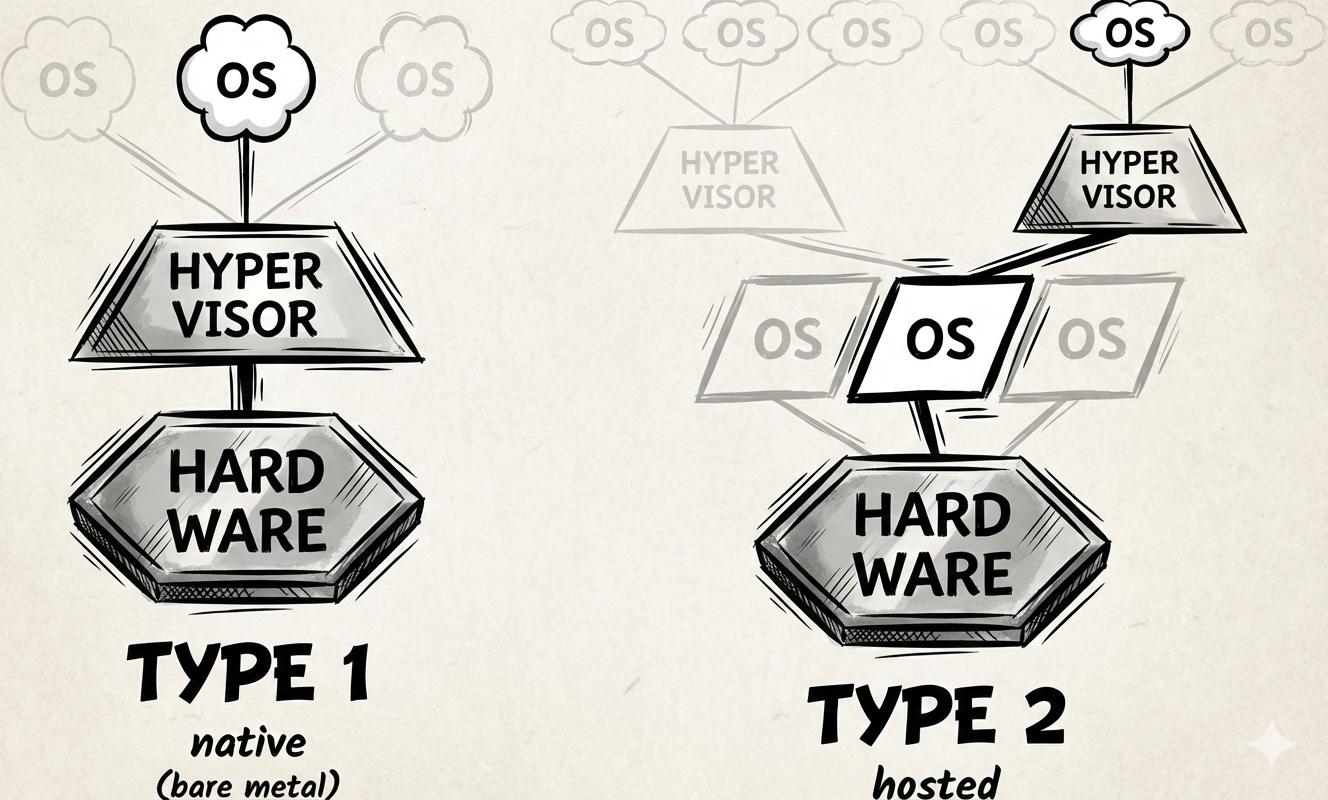
There exist multiple Hypervisor software products and not all work identically. A common classification is to distinguish between Type 1 and Type 2 Hypervisors.
Type 1 hypervisors are also called native or bare-metal hypervisors and run directly on the hardware of the host. In a way they are the OS that runs actually on the host. Commonly known are KVM, Xen or VMware ESXi.
Type 2 hypervisors (or hosted hypervisors), on the other hand, run on top of an OS. Type 2 hypervisors can be installed just like one would install an application and usually provide a graphical interface for managing virtualaized OSs. Commonly known are VirtualBox, Parallel Desktop (MacOS only) and GNOME Boxes.
Operating-System-Level Virtualization#
Hardware Virtualization creates a new OS on top of an existing kernel, allowing for fast and flexible isoltation.
Operating-system-level virtualization is a widely used architectural principle in modern infrastructure. Unlike hardware virtualization, which simulates physical hardware to run multiple distinct operating systems, this technique partitions a single host operating system into multiple isolated environments.
At the core of this architecture is the concept of the shared kernel. In a traditional virtualization setup, every guest requires its own full OS kernel to manage memory and hardware drivers, which creates significant overhead in terms of storage and startup time. In contrast, OS-level virtualization leverages the existing kernel of the host machine to run multiple “guests” simultaneously. This removes the need for an additional layer of heavy system software, allowing the environments to start in milliseconds rather than minutes.
To ensure stability and security, the host kernel creates isolated User Spaces, which are basically virtualized instances of the operating system’s memory and process environment. This isolation is achieved through two key kernel features:
Namespaces (Isolation of View):
These act as a visual filter, tricking the processes inside the virtualized environment into believing they are the only ones running on the system.
The environment sees its own independent file system, network stack, and process tree (often perceiving its main process as “Process ID 1”), while remaining blind to the host’s other processes.
Control Groups (Isolation of Resources):
Often referred to as “cgroups,” these enforce strict resource limits.
They ensure that a specific isolated environment can only consume a defined amount of CPU, RAM, or Disk I/O, preventing any single instance from exhausting the host’s resources.
The result is a Virtual Execution Environment: a lightweight, portable unit that bundles an application with all its dependencies. While it relies on the host kernel for execution, to the application running inside, it appears to be a fully independent operating system.
Virtual Machine (VM)#
Hardware virtualization done with any type of Hypervisor leads to a product with the well known name of Virtual Machine (VM).
A VM is more than just a Guest OS; it is a complete, software-defined computer. A VM is essentially a collection of distinct components that simulate the anatomy of a physical machine.
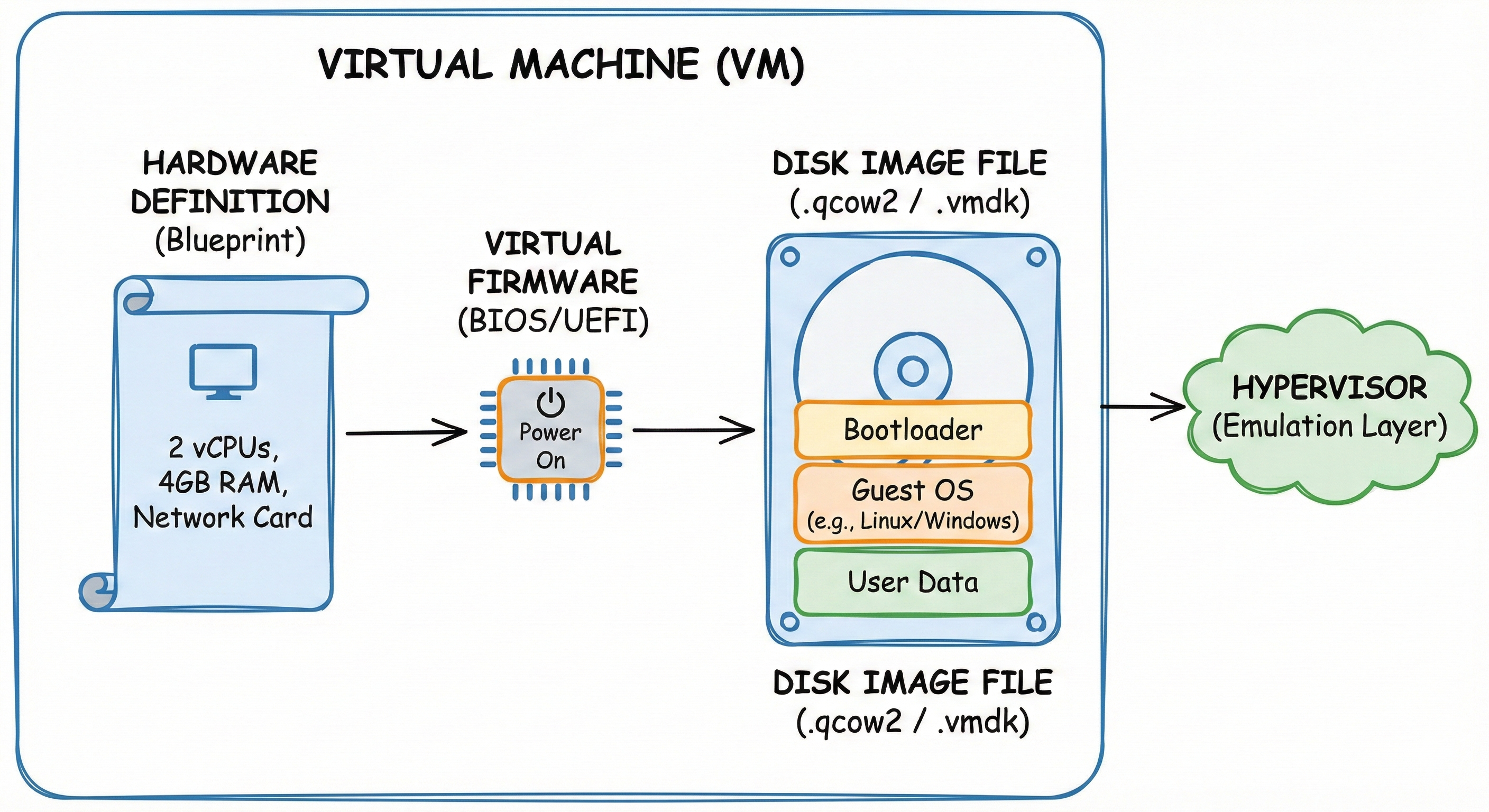
First, the VM relies on a Hardware Definition, which acts as the system’s blueprint. This configuration file (often XML in KVM/OpenStack) declares the virtual “motherboard,” specifying exact resources such as the number of vCPUs, the amount of RAM, and specific network or graphics cards. The Hypervisor reads this blueprint to wire together the virtual circuits.
Second, the VM possesses Virtual Firmware (BIOS or UEFI). Just like a physical server or computer, this tiny piece of software initializes the hardware when the “Power On” signal is sent, performing the critical boot sequence before the Operating System ever loads.
Finally, there is the Disk Image, which is the digital equivalent of the physical hardware storage you interact with daily.
You can think of this file (formats like .qcow2 or .vmdk) exactly like the physical Solid State Drive (SSD) or Hard Drive inside your laptop.
It is the persistent storage container that holds the Guest OS, the bootloader, and all your personal data.
The defining characteristic of this system is Hardware Emulation. The Guest OS operates under the illusion that it is interacting with real, physical hardware components. In reality, the Hypervisor intercepts these instructions (such as writing a file to the “disk”) and translates them into valid calls for the underlying Host Operating System.
Container#
Virtualization at the OS level leads to various products, like Zones, Jails, Virtual Private Servers, but most notably: Containers.
The dockerfile can contain both instructions for the image and the manifest!
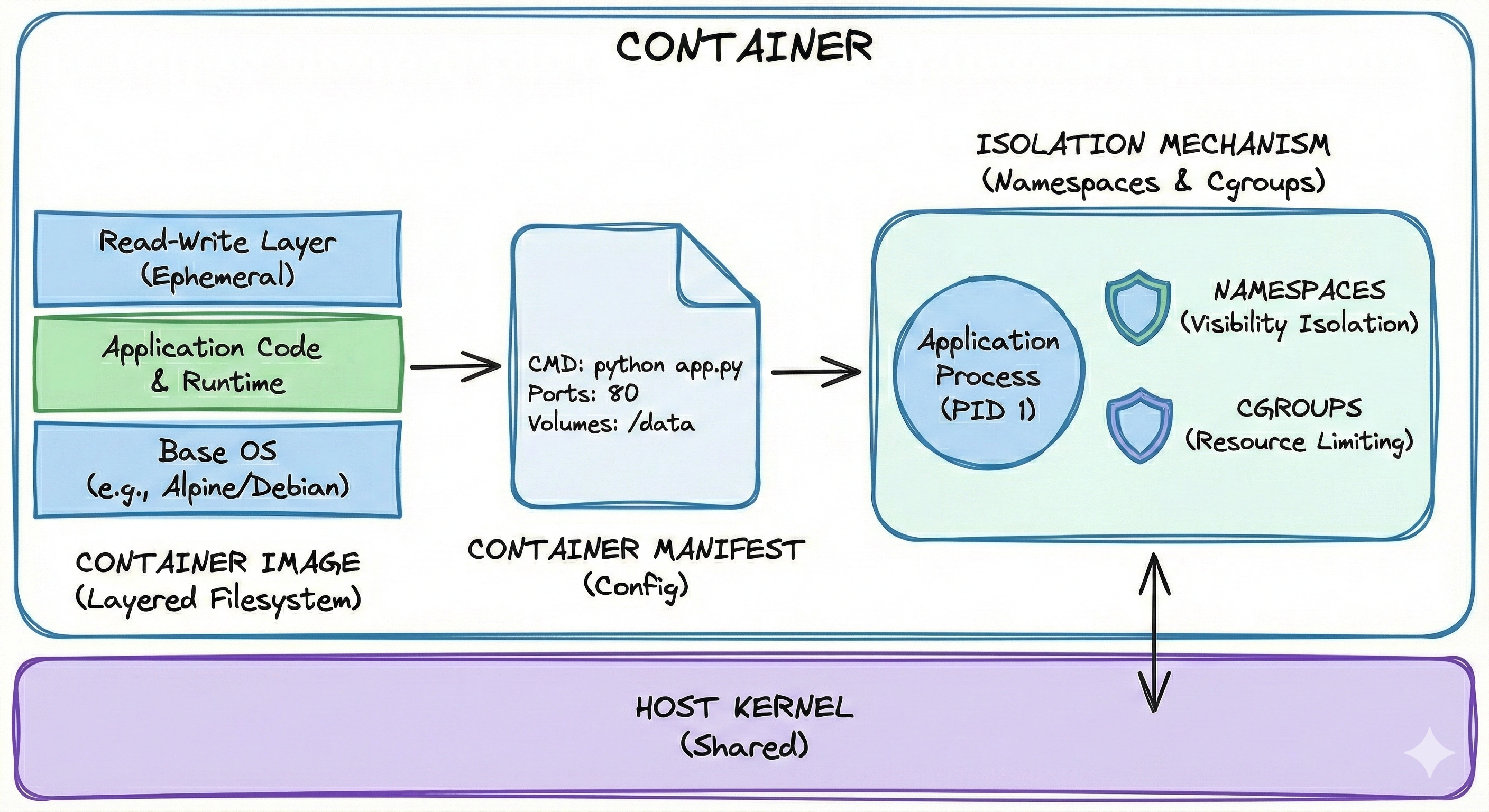
A container is not merely a running user space or an isolated process; it is a portable packaging format combined with strict kernel containment rules. It consists of three essential components: the Image, the Manifest, and the Isolation Mechanisms.
The Image: A Layered Filesystem#
A container starts as a static file known as the Image. Unlike a Virtual Machine, which is a single, monolithic file containing an entire operating system, a container image is built using a unique Layered Approach.
In this model, the filesystem is constructed by stacking multiple read-only changes on top of one another. When the container engine reads the image, it uses a Union Filesystem to merge these separate layers into a single, cohesive view.
Example of a Layered Image: When deploying a Python web application the image would be built in the following stack:
Layer 1 (The Base):
This contains the minimal Operating System files (e.g., Alpine Linux or Ubuntu Minimal). This layer is read-only.Layer 2 (The Runtime):
Installation of Python on top of the base. This layer records only the difference (the new Python binaries) added to Layer 1.Layer 3 (The Application):
Copy the source code (e.g.,app.py) into a folder. This records only the added code files.Layer 4 (The Container Layer):
This is the Read-Write layer. When the container starts, this thin, ephemeral layer is added on top. Any file the application creates or modifies (like logs or temp files) is written here.
Why Layering Matters: This approach provides massive efficiency. Different applications that all use Python on Alpine Linux all share the exact same physical copy of Layer 1 and Layer 2 on the disk. The system only stores the differences (Layer 3) for each app. A VM, by contrast, would require ten full copies of the OS and Python, wasting gigabytes of space.
The Manifest (The Config)#
Accompanying the image is the Manifest, a text file (typically JSON) that acts as the instruction manual for the container engine.
It describes exactly how to run the image.
It contains instructions such as: “Run the command python app.py on startup,” “Expose network port 80,” or “Mount the local folder /data into the container.”
The Isolation Mechanisms (The Walls)#
When the container actually starts, the engine (such as Docker or Podman) does not “boot” an OS in the traditional sense. Instead, it instructs the existing Linux Host Kernel to erect invisible walls around the application process. This is achieved using two specific kernel features:
Namespaces (Visibility):
These limit what the process can see.
For example, a PID Namespace ensures the container sees its own process as “PID 1” and cannot see or interact with other processes running on the host.
Cgroups (Control Groups - Resources):
These limit what the process can use.
They allow the administrator to set strict limits, such as “This container may use a maximum of 50% of one CPU core and 512MB of RAM,” ensuring no single container can exhaust the host’s resources.
A Practical Analogy: The Shared Research Lab
To make namespaces and cgroups more concrete, imagine a university research lab where multiple students share a single physical space and computing infrastructure.
Namespaces as Isolation Walls:
Each student works at their own bench with their own experiments.
When Student A logs into the shared compute server, they see only their own running processes and files in their home directory.
They cannot accidentally delete Student B’s data or interfere with Student C’s long-running simulation.
This is what namespaces provide: each container believes it is the only tenant on the system, seeing only its own “PID 1” process and its own filesystem tree, even though dozens of other containers might be running simultaneously on the same kernel.
Cgroups as Resource Quotas:
The lab manager allocates resources fairly: Student A gets 100 hours of GPU time per month, 500GB of storage, and access to 8 CPU cores maximum.
Student B gets a different allocation based on their project needs.
Without these limits, one student running an inefficient script could monopolize all 64 cores, blocking everyone else’s work.
Cgroups enforce these boundaries automatically.
If a container tries to use more than its allocated 512MB of RAM, the kernel either denies the request or terminates the container rather than allowing it to crash the entire host.
This two-layer approach is what makes containers both secure and efficient for multi-tenant environments like research clusters or cloud platforms.
Sources:
https://en.wikipedia.org/wiki/Virtualization
https://en.wikipedia.org/wiki/Hardware_virtualization