Cloud Operating System#
aka Cloud Computig Platform
Definition
A Cloud Operating System manages the infrastructure of a datacenter (compute, storage, networking) as a unified pool of resources, providing a dashboard and API for users to provision these resources on-demand.
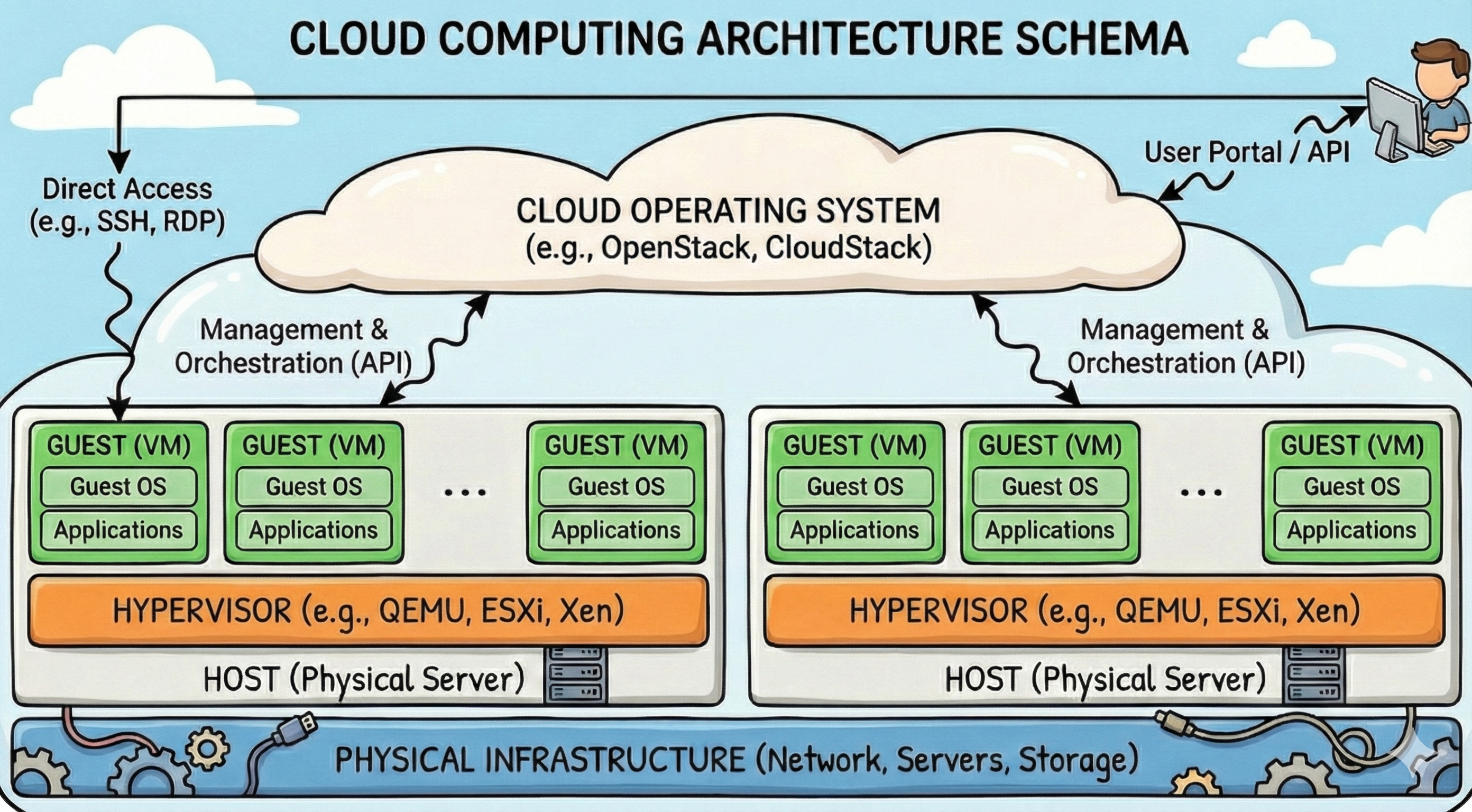
A Cloud Operating System (like OpenStack, VMware vCloud, or the software running AWS) is the layer of software that turns a room full of servers into a “Cloud.”
While a traditional Operating System (Linux, Windows) manages the hardware of a single machine to run applications, a Cloud Operating System manages the hardware of thousands of machines to run Virtual Machines.
Key Characteristics#
Resource Pooling: It hides the physical location of resources. You ask for “8GB of RAM,” and the Cloud OS finds it somewhere in the datacenter.
Elasticity: It allows the infrastructure to scale up or down automatically based on demand.
Measured Service: It tracks usage for billing or quota management (critical in academic shared facilities).
Components of a Cloud OS#
The Stack#
A Cloud OS is not one program; it is a collection of microservices working together.
Compute (Nova): Manages lifecycle of instances (VMs).
Networking (Neutron): Manages virtual networks, IPs, Firewalls.
Storage (Cinder/Swift): Manages block and object storage.
Identity (Keystone): Manages users, projects, and authentication.
Image (Glance): Manages VM snapshots and templates.
Using OpenStack (the standard open-source Cloud OS for academia) as an example, we can see the modular nature of a Cloud OS. Each function is handled by a distinct service:
1. Compute (Nova)
This is the heart of the system. It talks to the hypervisors (KVM, Xen) to spawn virtual machines. It schedules where a VM should land based on available capacity.
2. Networking (Neutron)
This is often the most complex part. It creates “Software Defined Networks” (SDN). It allows users to create their own private subnets, routers, and firewalls purely via software, without touching physical cables.
3. Storage (Cinder & Swift)
Block Storage (Cinder): Provides persistent “hard drives” that can be attached to running VMs.
Object Storage (Swift): Provides scalable storage for unstructured data (files, backups) accessible via URL, similar to AWS S3.
4. Identity (Keystone)
The central directory that authenticates users and determines which “Project” or “Tenant” they belong to, enforcing quotas (e.g., “Lab Group A has 500 CPUs”).
Infrastructure as Code (IaC)
The Paradigm Shift
Stop clicking buttons.
Start writing code.
Define infrastructure in text files (YAML, JSON).
The Benefit
Reproducibility: Identical environments every time.
Version Control: Track changes to your server specs.
Automation: Spin up 100 servers in minutes.
Terraform & Ansible
Because the Cloud OS exposes an API, you can program it. Tools like Terraform allow you to script the creation of your entire research environment.
One of the most powerful features of a Cloud Operating System is that it exposes every function via an API (Application Programming Interface).
This enables Infrastructure as Code (IaC). Instead of manually logging into a dashboard and clicking “Create VM” ten times, you write a script (using tools like Terraform or Ansible) that says: “I need 10 VMs, connected to this private network, with these security rules.”
When you run this script against the Cloud OS API, the system automatically provisions the entire environment. This is crucial for scientific reproducibility: you can publish your code and your infrastructure definition, allowing others to recreate your exact experimental setup with a single command.