
Concurrency#
Definition#

The ability of a system to progress in multiple tasks through simultaneous execution, context switching, coordination, process control, managing interactions and resources.
In other words, concurrency is the ability of a computer system to handle multiple tasks with overlapping lifetimes, rather than running them strictly one after another. It allows a program to be decomposed into independent segments that can run in parallel, be paused, or be resumed without altering the final outcome.
A concurrent system efficiently utilizes its computational capacity by avoiding idle time (e.g., switching to another task while waiting for data from RAM).
Example: Data Processing Pipeline#
Consider a program that needs to download and process multiple large datasets:
Fetch dataset 1 (30 sec)
Process (60 sec)
Fetch dataset 2 (30 sec)
Process (60 sec)
Total: 180 seconds
Fetch dataset (30 sec)
Process (60 sec)
Fetch dataset 2 during Process 1
Process (60 sec)
Total: 150 seconds (17% faster)
This illustrates how concurrency exploits natural waiting periods. While the CPU processes one dataset, the network interface downloads another, keeping both resources actively utilized rather than leaving one idle.
Issues & Challenges#
While concurrency offers massive potential for performance optimization, significant complexity and risk are introduced into the software architecture.
Because concurrent computations interact during execution, the number of possible execution paths becomes extremely large. This can lead to indeterminacy, where a program’s outcome is dictated by the precise timing of events rather than strict code logic.
Under such conditions, a program may produce incorrect computational outcomes, enter a deadlock, or be permanently denied necessary resources (process starvation), severely impacting reproducibility.
Example:
A fundamental illustration of indeterminacy is the lost update problem. When a shared counter is incremented by multiple threads simultaneously, the expected outcome is rarely achieved:
The non-atomic increment: counter = counter + 1 requires three steps: Read, Add, Write.
import threading

counter = 0

def increment():
    global counter
    for _ in range(100000):
        counter = counter + 1  # Read, add, write

t1 = threading.Thread(target=increment)
t2 = threading.Thread(target=increment)
t1.start(); t2.start()
t1.join(); t2.join()

print(counter)  # Expected: 200000, Actual: Indeterminate
Executing this program multiple times produces varying, non-reproducible results (e.g., 143256, 158432, 127891).
The operation counter = counter + 1 is not atomic; it consists of three distinct machine-level operations:
Read the current value.
Add one.
Write the result back.
If multiple threads read the identical value before a write operation occurs, updates are overwritten and lost. Since the exact interleaving of these operations depends on unpredictable OS scheduler timing, the final result changes with each execution.
The Efficiency Gap#
Concurrency establishes the potential for efficient execution; it does not guarantee it. Designing an architecture to realize this efficiency is a highly complex engineering task. It necessitates the implementation of reliable techniques for execution coordination, data exchange, and memory allocation.
Furthermore, success is heavily dependent on the task profile: while some problems are easily decomposed into independent units, others are tightly coupled. In tightly coupled scenarios, performance gains can easily be negated by the synchronization and communication overhead required to maintain data integrity.
Concurrency Workflow#
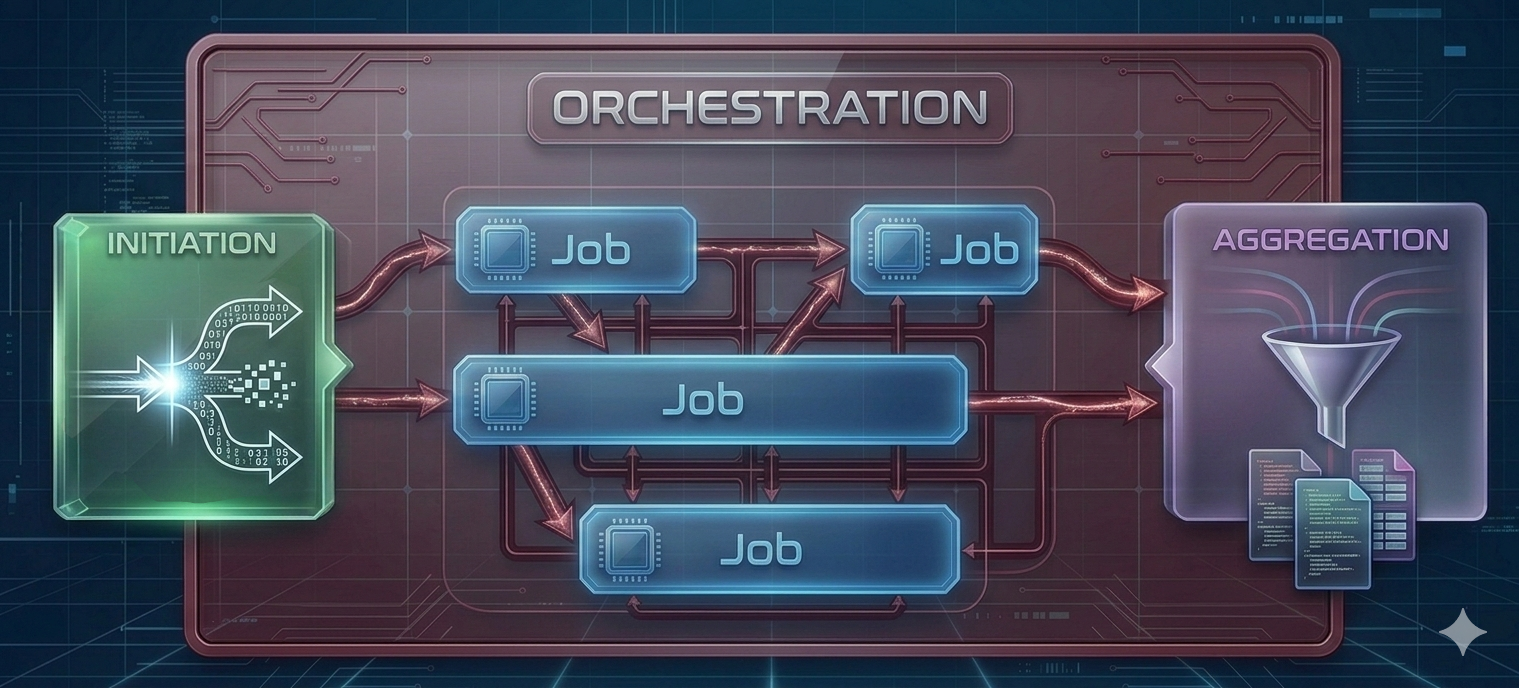
Concurrency can conceptually be broken up into 4 interacting parts:
Orchestration: The overarching structure and schedule of tasks are determined. Dependencies are mapped, and necessary resources are identified before execution begins.
Initiation: The individual execution units (processes, threads, or coroutines) are spawned. Required data and specific execution parameters are distributed to these units.
Job(s): The discrete, independent units of work are executed. This encompasses the actual computational processing or I/O operations performed by the allocated resources.
Aggregation: The outputs from the completed jobs are collected, synchronized, and consolidated. Execution is typically halted until all concurrent units have successfully reported their final state or results.
This pattern is remarkably universal, appearing in contexts ranging from multi-core laptop computations to large-scale distributed systems. Understanding this workflow helps identify where concurrency frameworks can be applied and what communication overhead to expect.
Parallelism requires multiple physical cores — one per task executing simultaneously. This hardware constraint limits the universal application of parallel execution. However, modern software applications frequently perform I/O operations, await external input, execute network requests, or offload workloads to dedicated accelerators (e.g., GPUs). In such situations, the software thread does not need to occupy the CPU and can be paused (or blocked), freeing up CPU capacity until those auxiliary activities complete. This is where concurrency becomes valuable even on a single core: while one thread is blocked by I/O, CPU cycles can be reallocated to another thread to maintain progress. While this does not constitute true parallelism, overall throughput and responsiveness are improved by preventing CPU idling during slow operations.
Parallelism#
An analogy: eating and singing can be performed concurrently (alternating actions) but not in parallel (simultaneously).
Concurrency: Progress multiple tasks over a period of time.
Parallelism: Simultaneous execution of multiple tasks.
Parallelism is a form of concurrency that is limited by the number of physical cores.
The efficiency of a parallel solution depends heavily on how frequently tasks must exchange information:
Embarrassingly Parallel: Tasks require little to no information exchange after orchestration. These problems are ideal for parallelization and are the easiest to implement efficiently.
Loosely Coupled: Tasks need occasional information exchange (e.g., a few times per second or less). Communication overhead is manageable with proper architecture.
Tightly Coupled (Fine-grained parallelism): Tasks must exchange information frequently (e.g., many times per second). These scenarios are challenging to parallelize efficiently due to communication costs and synchronization overhead.
As a general principle: Problem evaluation should begin by determining if the workload is embarrassingly parallel. If so, parallelization is generally advantageous. For tightly coupled problems, the communication overhead must be carefully evaluated to ensure it does not negate the benefits of parallel execution.
Information Flow in the Workflow#
Different stages of the parallelization workflow possess different communication characteristics:
During Initiation: Nearly all parallel workflows require information dissemination to initialize tasks with appropriate parameters, data subsets, or configurations.
During Execution: Requirements vary greatly depending on problem coupling:
Embarrassingly parallel jobs may require zero communication.
Tightly coupled jobs require continuous information exchange.
During Aggregation: Most workflows require collecting results from all tasks, though the volume can range from simple success/failure signals to large datasets.
Understanding these communication patterns aids in the selection of appropriate hardware architectures and software frameworks for specific use cases.
Processes vs. Threads vs. Coroutines#
Processes: Independent program instances, each with their own memory space. They are isolated from one another and require explicit mechanisms for communication (Inter-Process Communication, or IPC).
Threads: Lightweight units sharing memory within a process. Fast communication but risk race conditions.
Coroutines: Can be understood as suspendable tasks that are processed by a thread.
Analogy
The Process (The Workshop Facility) An isolated workshop facility is provisioned by a central municipality (the operating system). This facility encapsulates a shared pool of tools and raw materials (process memory space). Strict physical boundaries are enforced to prevent interference from external facilities, ensuring memory isolation.
The Threads (The Workers) Within this isolated facility, one or multiple workers (threads) are deployed as the primary execution engines. All workers operating inside the facility are granted concurrent access to the identical shared pool of resources.
The Physical Cores (The Workstations) Physical workstations (hardware CPU cores) are allocated to the facility by the municipality’s centralized scheduler. If multiple workstations are provisioned and multiple workers are deployed, true parallel execution is achieved. To guarantee execution reproducibility and minimize timing variance, specific workers can be rigidly bound to specific workstations (analogous to strict thread affinity configurations in standard open-source kernels).
The Coroutines (The Suspendable Projects) A queue of discrete, independent projects (coroutines) is maintained within the facility. Cooperative multitasking is utilized by the workers to maximize continuous utilization. When a specific project is blocked by an external dependency—such as a mandated waiting period for material delivery (I/O latency)—progress is voluntarily suspended. The exact state of the project is preserved on the workbench. The worker’s effort is immediately reallocated to advance an alternative project from the queue. Upon resolution of the external dependency, the preserved project is subsequently resumed by an available worker from the precise point of suspension.
Architectural Levels of Parallelism#
Parallelization can occur at multiple architectural levels, each with distinct characteristics, capabilities, and use cases. Understanding these levels helps you choose the right approach for your computational needs.
Multi-Core Architectures#
Multi-core computers are the most accessible form of parallel hardware. Your laptop or workstation likely has multiple cores. Todays modern personal devices typically feature 4 to 16 physical cores.
Key Characteristics:
All cores share access to the same main memory (RAM)
Communication between cores is fast and efficient
Cores are physically close together on the same chip
Limited by the number of cores available on a single processor
Communication Mechanism:
Shared memory enables efficient data exchange
Thread-level parallelism within a single process
Process-level parallelism with relatively low IPC overhead
Typical Use Cases:
Data processing on personal devices
Development and testing of parallel algorithms
Tasks that fit within the memory and computational capacity of a single machine
Note
Hyper-Threading Architecture
You may see specifications like “8 CPU / 16 threads” on modern processors. This indicates Hyper-Threading (HT), where a single physical core is optimized to handle two threads concurrently.
Important: An 8 CPU / 16 Thread machine can run 8 tasks in parallel, not 16. However, it excels at managing two threads per core concurrently. Since threads often wait for I/O or memory operations, running two threads per core can utilize idle CPU cycles, increasing overall efficiency.
Cluster Architectures (HPC)#
High-Performance Computing clusters consist of many networked computers (nodes), each with multiple cores. Academic institutions often provide access to such systems for research computing.
Key Characteristics:
Hundreds to thousands of individual multi-core nodes
Nodes connected via high-speed network infrastructure
Shared or distributed file systems for data access
Managed by workload schedulers (e.g., Slurm, PBS)
Communication Mechanism:
Jobs scheduled across nodes by resource manager
Network-based communication between nodes (higher latency than multi-core)
Each node can use multi-core parallelism internally
Multi-level parallelism: parallel jobs across nodes, each using multiple cores
Typical Use Cases:
Large-scale scientific simulations
Parameter sweeps requiring hundreds or thousands of runs
Problems requiring more memory or compute than available on single machines
Batch processing of many independent tasks
Advantages:
Massive computational capacity
Well-suited for embarrassingly parallel problems
Optimized infrastructure and support for research computing
Challenges:
Job scheduling queues may introduce wait times
Network communication between nodes adds overhead
Requires learning cluster-specific tools and submission systems
Cloud Architectures#
Cloud computing platforms (AWS, Google Cloud, Azure, or institutional clouds) provide on-demand access to computational resources that can be dynamically scaled.
Key Characteristics:
Flexible resource allocation (scale up or down as needed)
Pay-per-use model or institutional allocations
Access to specialized hardware (GPUs, high-memory instances)
Infrastructure-as-code for reproducible setups
Communication Mechanism:
Similar to clusters: network-based communication between instances
Can provision multiple instances, each with multiple cores
Orchestration typically managed by cloud-native tools or custom scripts
Storage often separate from compute (object storage, network file systems)
Typical Use Cases:
Variable workloads that don’t require constant resources
Projects requiring specialized or diverse hardware configurations
Collaborative work requiring shared remote infrastructure
Integration with cloud-native data processing services
Advantages:
On-demand scaling without waiting in queues
Access to latest hardware without local investment
Geographic distribution and redundancy options
Integration with managed services (databases, machine learning platforms)
Challenges:
Cost management requires careful monitoring
Network latency can impact tightly coupled workloads
Different mental model compared to traditional HPC
Responsibility for infrastructure setup and security
Multi-Level Parallelism#
In practice, cluster and cloud architectures consist of many networked multi-core computers. This means parallelization can occur simultaneously at multiple levels:
Between machines: Distributing independent jobs across multiple nodes or cloud instances
Within machines: Each node/instance uses multi-core parallelism for its assigned task
This hierarchical structure offers flexibility but requires careful planning:
Use coarse-grained parallelism between machines (minimize network communication)
Use fine-grained parallelism within each machine (leverage shared memory)
Avoid over-subscription: don’t request more threads than available physical cores
Choosing the Right Level#
The appropriate architectural level depends on your problem characteristics:
Problem Characteristic |
Recommended Level |
|---|---|
Fits on laptop, moderate computation |
Multi-core (local) |
Embarrassingly parallel, many runs |
Cluster or Cloud |
Large memory requirements (> 64 GB) |
HPC nodes or high-memory cloud instances |
Tightly coupled, frequent communication |
Multi-core or single high-performance node |
Variable resource needs |
Cloud |
Sustained computational campaigns |
HPC cluster |
GPU acceleration required |
Cloud or specialized HPC nodes |
Tip
Start small: Develop and test your parallelization approach on your local multi-core machine before scaling to clusters or cloud. This iterative approach helps identify issues early and reduces wasted resources.
Sources:
https://en.wikipedia.org/wiki/Concurrency_(computer_science)