The Cloud#
Infrastructure as a Service (IaaS) deployments are often simply called: Clouds
Cloud Computing Schema#
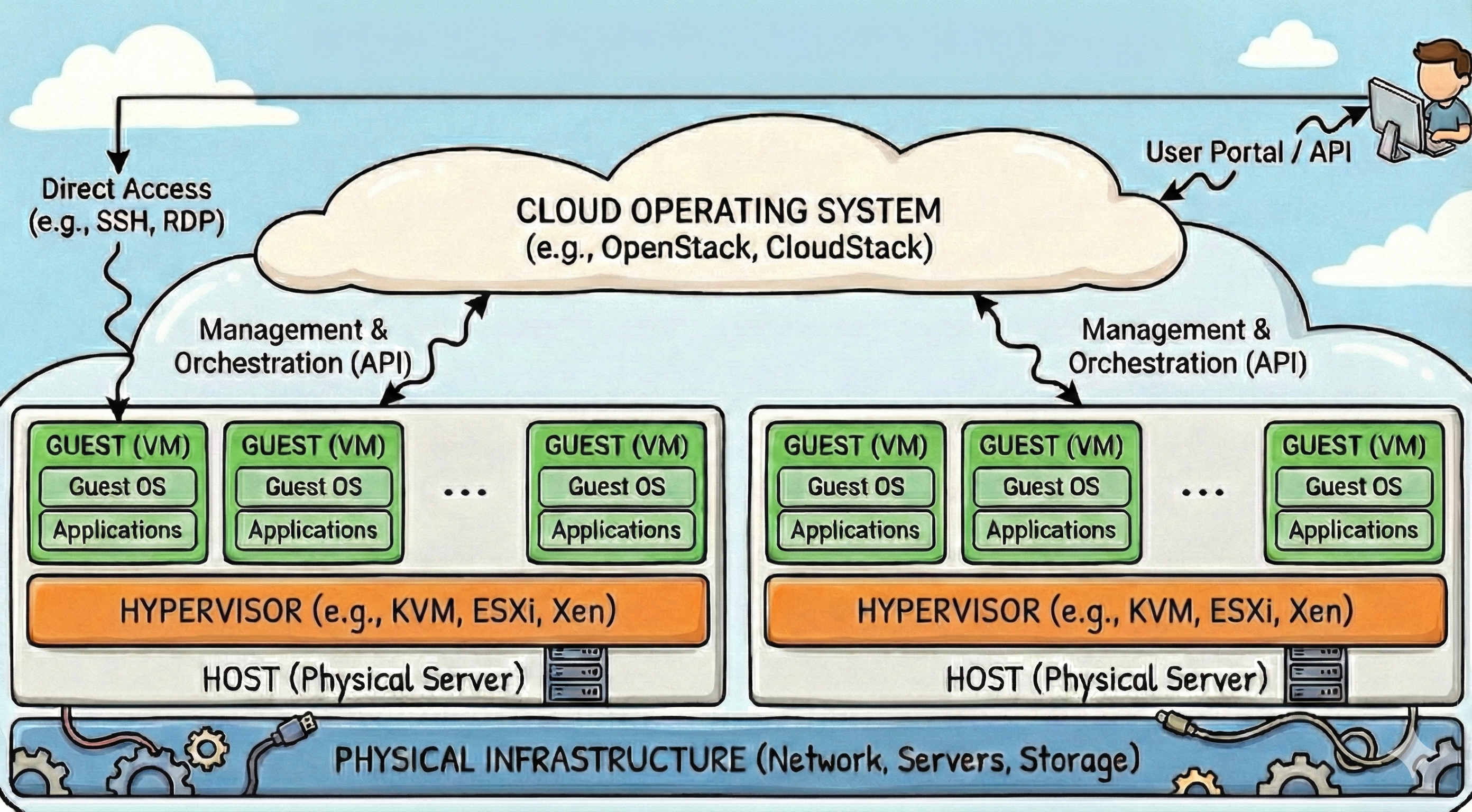
From a user perspective, a cloud environment provides two distinct interaction channels:
The Management Channel (Control Plane):
This interaction occurs via a Web Console (GUI), Command Line Interface (CLI), or SDK (API).
It is used to provision, configure, and monitor resources.
Crucially, this is also where bootstrapping occurs—allowing you to inject the necessary credentials (like SSH public keys or startup scripts) that enable the second channel.
The Resource Channel (Data Plane):
This is the direct interaction with the active workload.
While the Management GUI often provides a fallback “Console Access” (simulating a physical monitor via VNC), day-to-day operations are achieved through standard protocols like SSH (for Linux), RDP (for Windows), or application-level interfaces (e.g., HTTPS for JupyterLab).
The cloud operating system acts as orchestrator allocating the necessary resources to the users requests. It manages the life-cycles of VMs including backups, snapshots and shelfing (store a switched-off-VM for later use).
Cloud Features#
Modern Cloud Operating Systems (Cloud OS), like OpenStack, perform much more than the automated provisioning of VMs. It serves as the orchestration engine for a cloud infrastructure. It manages large pools of compute, storage, and networking resources throughout a datacenter, turning them into a single programmable entity. From a user’s perspective, the Cloud OS provides the ability to request virtual machines, networks, and storage without needing to know where they physically reside. Explained are the features present in OpenStack:
Storage Management#
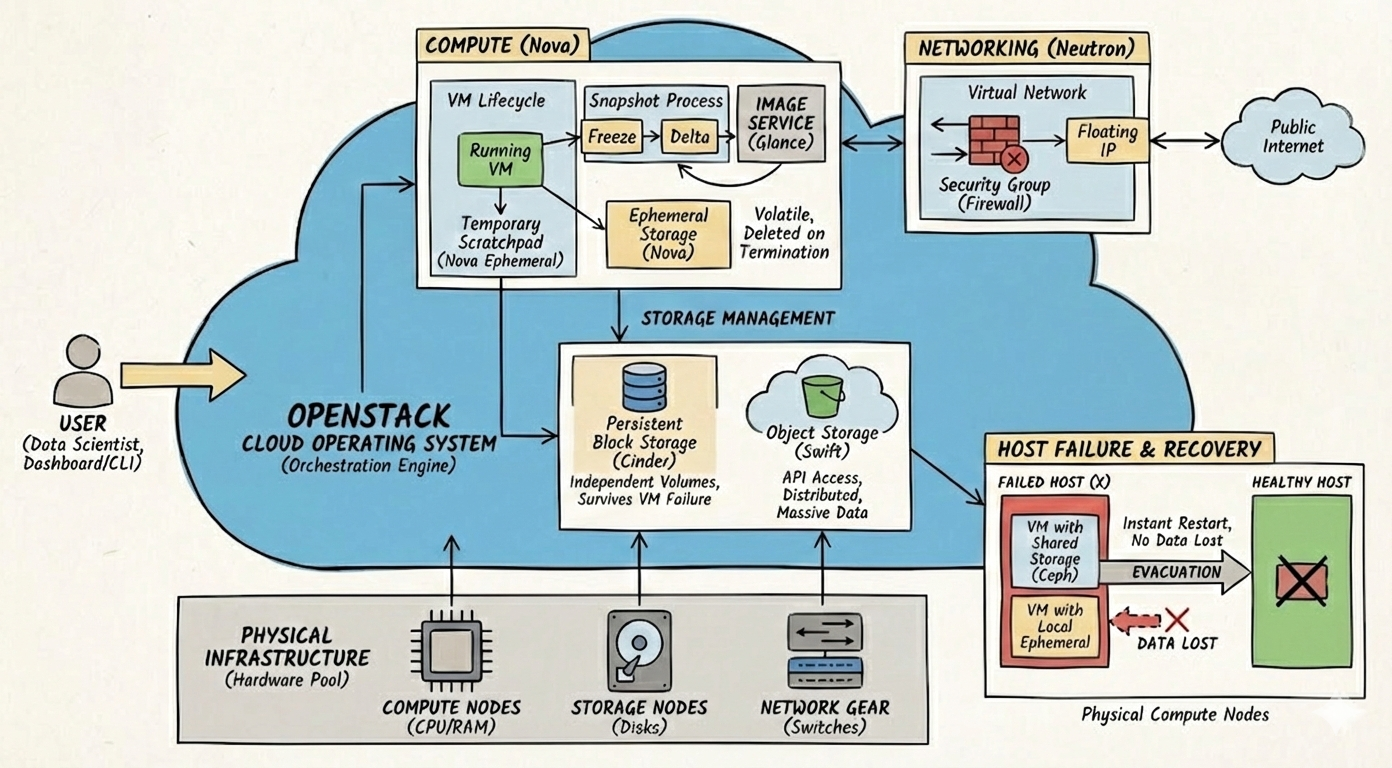
In a Cloud, storage is not a monolithic entity, neither is it restricted to the available disk space on a specific host machine, instead it is split into distinct services addressing different persistence needs:
Ephemeral Storage1Ephemeral: lasting for a very short time. (Nova): This can be set-up locally, or shared.
In the local setup, when a VM is spawned, OpenStack (via Nova) creates a temporary “scratchpad” disk on the host server.
This disk is tightly coupled to the lifecycle of the VM; if the VM is terminated, this storage (and all data inside it) is deleted permanently.
It contains the /home folder and is typically used for the Operating System files and temporary caches.
Tip
A quick performance tests can help to identify if the VM has local ephemeral storage or shared:
dd if=/dev/zero of=speedtest_file bs=1G count=1 oflag=direct
If the process reports write speeds below 300MB/s then the location likely resides on shared storage.
In the shared setup the VMs “scratch” disk is created on a central storage cluster (typically with Ceph). This has the advantage that a VM can be migrated almost instantly from one physical host to the other. It comes with a drawback, though: Every read/write operation of the OS goes through the networks and most likely quite a bit slower than read/write speeds to a local SSDs.
Persistent Storage (Cinder):
For important data (like databases), OpenStack uses Cinder to create “Volumes”.
These function like external hard drives that exist independently of any specific VM.
If a VM crashes or is deleted, the Cinder volume remains safe and can be re-attached to a new VM instantly.
Object Storage (Swift): For massive, unstructured datasets (e.g., training images or log files), Swift provides storage that is accessed via API rather than a file system. It is distributed across many physical servers, ensuring that if one hardware node fails, the data remains accessible from another copy.
Networking#
OpenStacks networking component, Neutron, provides “network connectivity as a service,” allowing users to define their own networks and addressing within the cloud. Crucially for security, it implements Security Groups, which act as virtual firewalls at the instance level. By default, these groups often deny all incoming traffic, requiring the user to explicitly open specific ports (e.g., port 22 for SSH or 80 for Web). Neutron also manages Floating IPs, which are public IP addresses that can be dynamically mapped to a VM’s private IP, bridging the gap between the secure internal cloud network and the public internet.
Lifecycle and Snapshots#
The virtualization layer allows for the preservation of a VM’s state through Snapshots.
A snapshot is not merely a copy of a file; it is a point-in-time image of the running disk.
When a user triggers a snapshot, the Hypervisor (e.g., KVM) momentarily “freezes” the filesystem (using tools like fsfreeze) to ensure data consistency.
It then creates a delta file (difference) of the disk, converts it into a disk image, and uploads it to OpenStacks Image Service (Glance).
This resulting image can be used to spawn entirely new VMs that are identical clones of the original, enabling rapid scaling of data science environments.
Host Failure and Recovery#
A critical function of any Cloud OS is handling physical hardware failures, a process known as Evacuation. If a physical Compute Node (Host) fails, the Cloud OS detects that the node is unreachable. If the VMs were using Shared Storage (e.g., Ceph), the Cloud OS can instantly restart those VMs on a healthy physical host. The VM retains its original IP address and ID, and because the disk data was on the network (not the dead host), no data is lost. However, if the VM was using Local Ephemeral Storage on the failed host, the instance can be evacuated to a new host, but the data on its scratch disk is irretrievably lost. This architectural distinction dictates that critical data must always be written to Cinder volumes or Swift object storage.
Cloud Operating System#
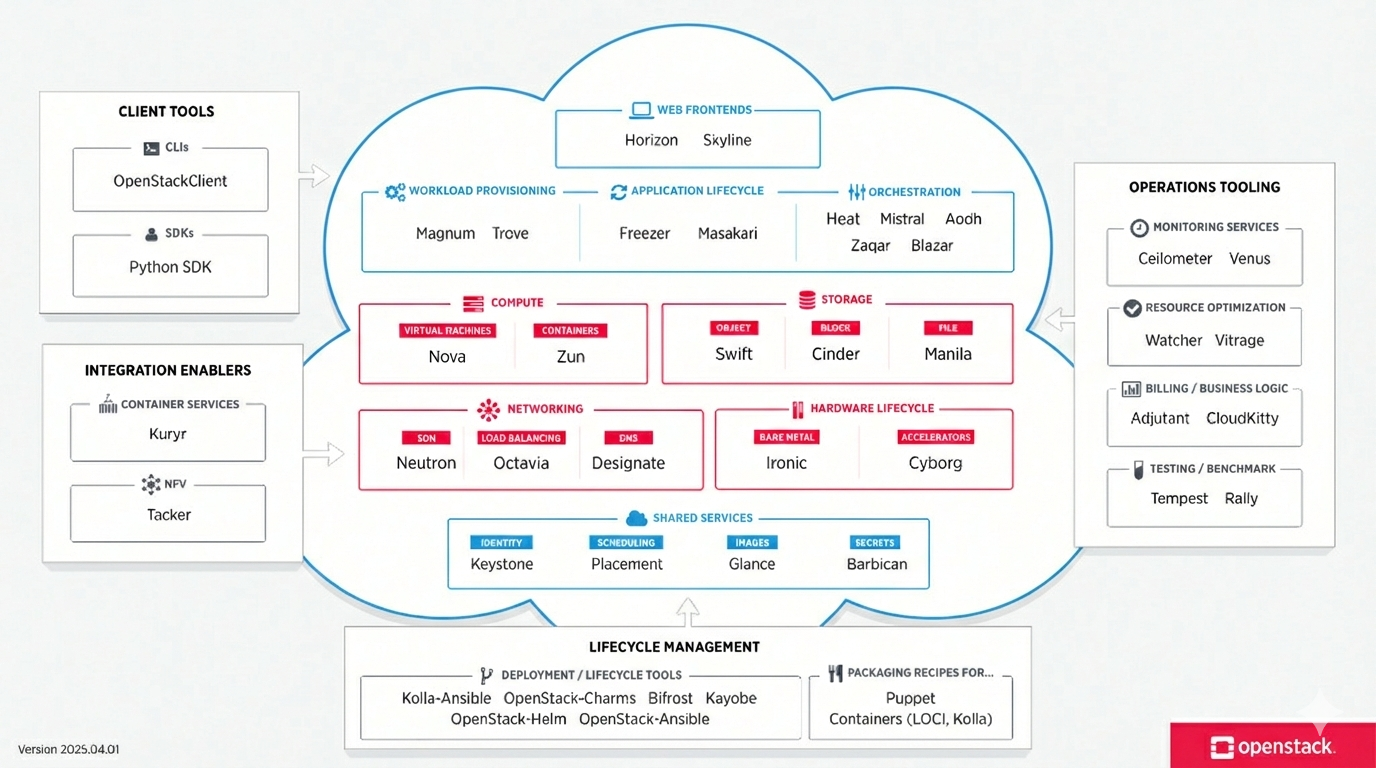
For a user, interfacing with a Cloud OS, like OpenStack, is fairly straightforward. However setting up and maintaining a Cloud OS are far from trivial.
OpenStack provides a nice overview of all the different services needed to run a modern Cloud:
Sources:
https://en.wikipedia.org/wiki/Hypervisor
https://docs.openstack.org/2025.2