
HPC Clusters#
Computer clusters can have various functionalities, HPC is just one of them.
High Performance Computing as a Service (HPCaaS) deployments are commonly called: HPC Clusters
HPC Cluster Schema#
Hardware aggregation done with high-speed networking leads to a system with the well-known name of High Performance Computing (HPC) Cluster.
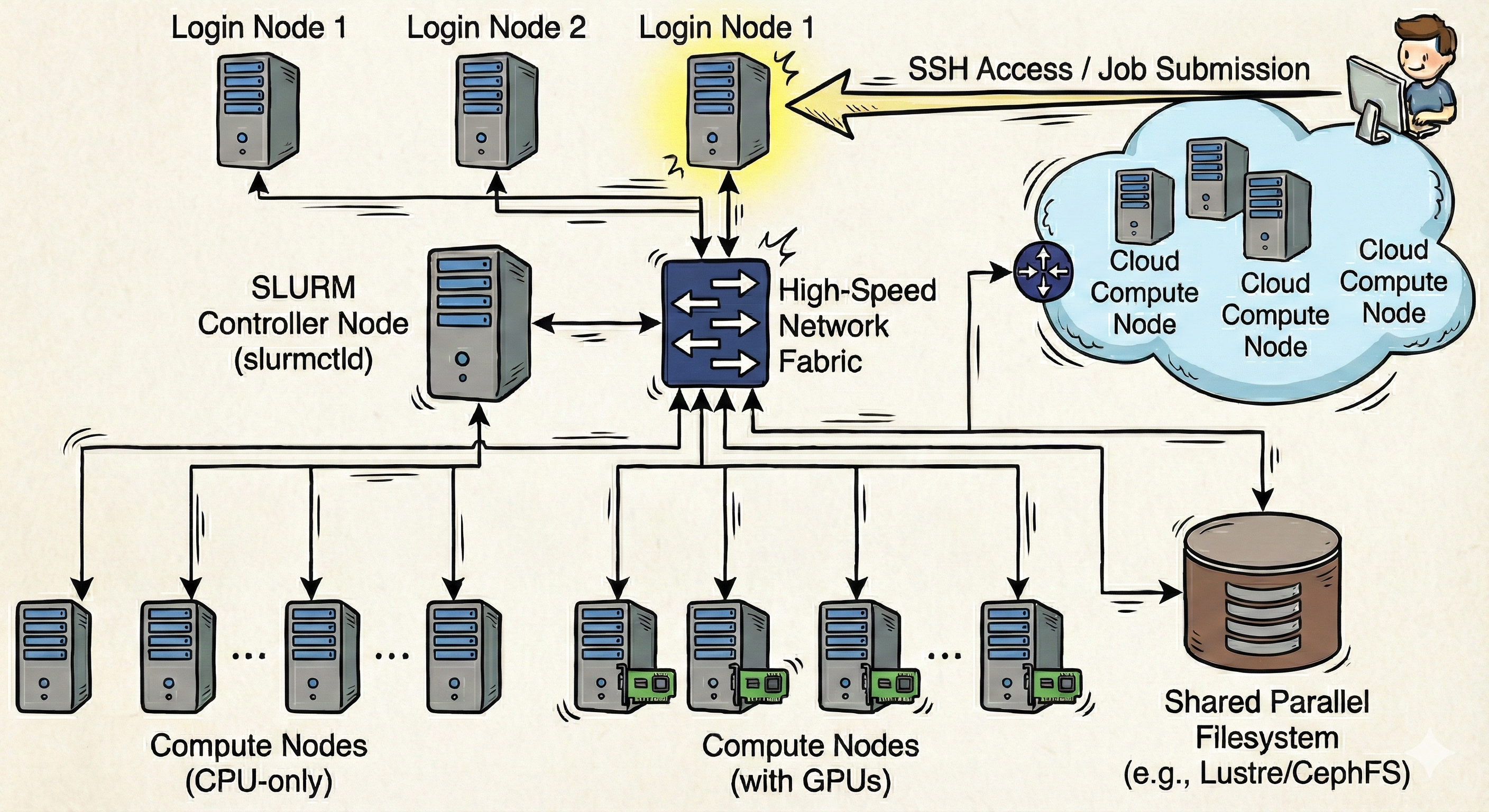
An HPC Cluster is more than just a powerful server; it is a unified, software-orchestrated fleet of computers. An HPC Cluster is essentially a collection of distinct physical machines that simulate the anatomy of a single supercomputer.
First, the Cluster relies on the Login Nodes (or Head Nodes), which act as the system’s gateway.
These specific servers serve as the users “control room”, specifying where job submissions, script editing, and software environment management occur.
These nodes can be compared to the terminal on a local laptop, but with one critical rule: they are for orchestration, not calculation!
Login Nodes are the interface where resource definitions are made, such as the number of GPUs, the amount of RAM, or the wall-time for a training run.
Second, the Cluster possesses a Workload Manager (or Scheduler).
Just like a project manager assigning tasks to a team, this critical piece of software (often Slurm or PBS) acts as the broker between the code and the hardware.
It reads the “job scripts” (the blueprints that declare requirements) and places the task into a queue.
It waits untill the specific combination of requested resources becomes available before dispatching the job to the hardware.
Third, the Cluster is built on Compute Nodes, which act as the system’s processing power.
These are often multiple racks of distinct, powerful servers. These are roughly speaking the digital equivalent of the CPU and GPU in a workstation, but scaled up significantly.
This is where the calculation actually happens; when the scheduler dispatches a job, the Python or R code executes on the specific CPUs or GPUs of these distinct machines.
Finally, there is the Shared Storage, which is the digital equivalent of the physical hard drive found in a standard computer.
This persistent storage container (parallel file systems like Lustre or GPFS) holds massive datasets, trained models, and simulation results.
Because this storage is mounted on every node, a model trained on a Compute Node is immediately visible and accessible on the Login Node for analysis.
The defining characteristic of this system is the Interconnect. The individual Compute Nodes operate under the illusion that they are close neighbors. In reality, high-speed cables (like InfiniBand) link these separate machines, allowing them to pass data back and forth with such low latency that they can function as a single, coherent unit for distributed training or massive data processing.
HPC Cluster Features#
Modern High Performance Computing (HPC) Workload Managers, like Slurm, perform much more than the simple execution of scripts. It serves as the orchestration engine for a cluster infrastructure. It manages large pools of compute nodes, GPUs, and parallel storage systems throughout a datacenter, turning them into a single programmable entity. From a user’s perspective, the Workload Manager provides the ability to request precise computational resources without needing to know which specific rack or server they will occupy.
Explained are the features present in a Slurm Cluster:
Storage Architecture#
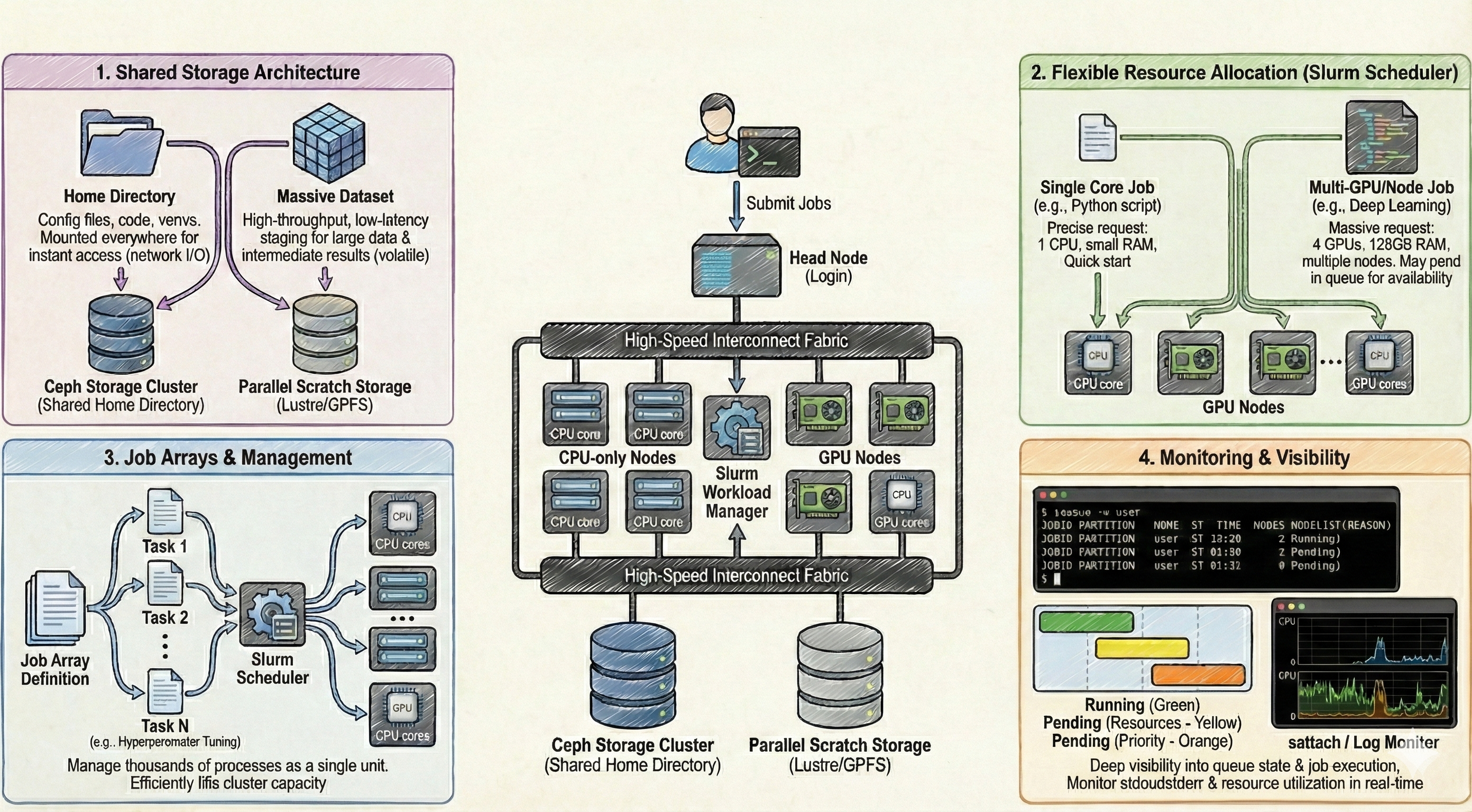
In an HPC Cluster, storage is not a monolithic entity, neither is it restricted to the available disk space on the specific compute node where a job lands. Instead, it is split into distinct hierarchies addressing different persistence and performance needs:
Shared Home Directory (Ceph): This is the default entry point for any user logging into the system. In this shared setup, the user’s home directory is hosted on a central storage cluster (typically backed by Ceph or a similar distributed filesystem). This filesystem is mounted across every single node (Head and Compute alike). This ensures that configuration files, source code, and lightweight virtual environments are instantly available regardless of where a job is scheduled to run. However, similar to cloud shared storage, every read/write operation travels through the network, making it suboptimal for heavy I/O operations during processing.
Shared Scratch Storage: For data-intensive operations, the cluster provides a “Scratch” folder, which is also a shared resource accessible from all nodes. Unlike the Home directory, this storage is engineered for high-throughput and low-latency access, often utilizing parallel file systems like Lustre or GPFS. It serves as the staging area for massive datasets and intermediate results during active computation. While it offers superior speed, it is typically volatile; data residing here is often subject to automated purging policies once the associated job or project timeline concludes.
Job Scheduling and Resource Management#
The defining feature of the Slurm scheduler is the granular control over resource allocation, allowing for the execution of anything from a single core process to massive parallel simulations.
Flexible Resource Allocation: A single job submission allows for the specific request of resources, ranging from a single CPU core to multiple full nodes equipped with GPU accelerators. This flexibility allows for the precise tailoring of hardware to the code’s requirements (e.g., requesting 4 GPUs and 128GB of RAM for a deep learning model). This flexibility, however, presents a scheduling challenge: the more specific and massive the resource request, the longer the job may sit in the pending queue waiting for that exact combination of hardware to become available.
Job Arrays and Management: For tasks requiring high throughput, such as hyperparameter tuning or processing thousands of individual data files, Slurm implements Job Arrays. Instead of manually submitting hundreds of individual jobs, a single array definition spawns multiple “tasks” that share the same resource requirements but operate on different input data. This allows the scheduler to manage thousands of processes as a single logical unit, filling available gaps in the cluster’s capacity efficiently.
Monitoring and Visibility#
Slurm provides deep visibility into the state of the cluster, offering monitoring capacities that extend beyond simple pass/fail reporting. Users can query the exact state of the queue, inspecting why a job is pending (e.g., “Resources” or “Priority”). Furthermore, it allows for the attachment to running processes to monitor standard output (stdout) and error logs in real-time. This management layer ensures that users can track the efficiency of their allocations, verifying that the requested CPUs and GPUs are being fully utilized rather than sitting idle.
Slurm Cluster Architecture#
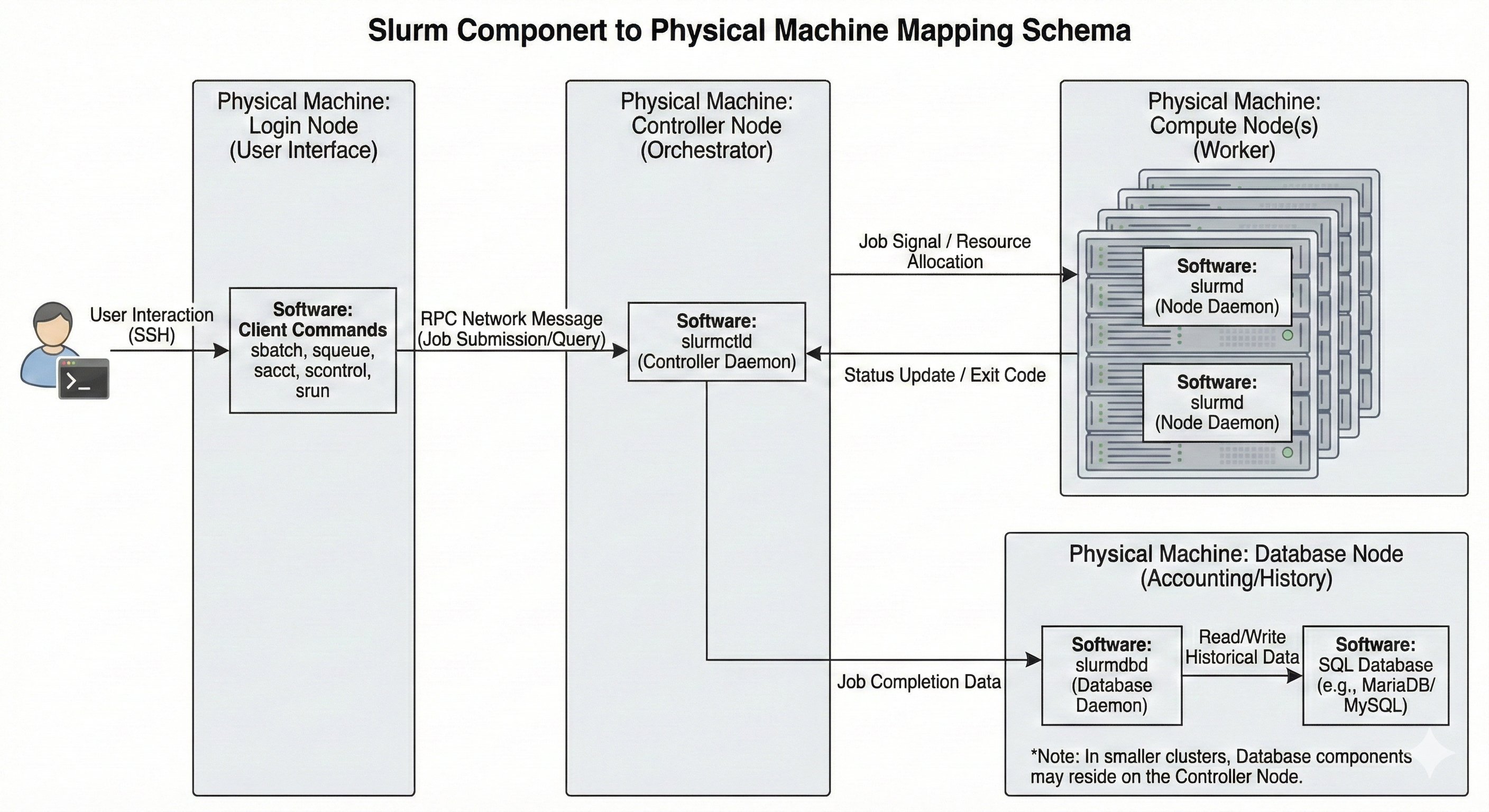
Slurm is essentially a collection of distinct daemons1A daemon is a background process that runs continuously on a server, waiting to handle requests or perform scheduled tasks without direct user interaction. and tools that simulate a single, unified computing entity.
The Core Architecture (Orchestration):
The system relies on a Centralized Manager (slurmctld), which acts as the system’s brain.
This daemon monitors resources and work, maintaining the state of the entire cluster in memory.
To ensure continuous operation, a backup manager may also exist to assume these responsibilities in the event of a primary failure.
Interfaces are modernized through the optional REST API Daemon (slurmrestd), which allows for interaction with Slurm through standard web-based APIs.
The Compute Fabric (Execution):
The Cluster possesses the Node Daemon (slurmd) residing on each compute server.
This daemon functions comparably to a remote shell: it waits for work, executes that work, returns status, and waits for more work.
These daemons provide fault-tolerant hierarchical communications, ensuring that instructions from the controller are reliably executed on the hardware.
The Accounting (Data Persistence):
There is the Database Daemon (slurmdbd), which acts as the system’s long-term memory.
This optional component records accounting information for multiple Slurm-managed clusters in a single database.
It is managed by the administrative tool sacctmgr, which identifies valid users, accounts, and clusters, enforcing limits and tracking usage over time.
The Interface (User & Admin):
User tools include srun to initiate jobs, scancel to terminate queued or running jobs, sinfo to report system status, and squeue to report the status of jobs.
For historical analysis, sacct provides information about jobs and job steps that are running or have completed.
Administrators utilize scontrol to monitor and modify configuration and state information on the cluster, while sview offers a graphical report of system and job status, including network topology.
Sources:
https://en.wikipedia.org/wiki/High-performance_computing
https://en.wikipedia.org/wiki/Computer_cluster
https://slurm.schedmd.com